

Introduction:
Navigating the Christmas payroll cycle is one of the most complex operational hurdles for UK employers. While the intention to provide employees with their wages ahead of the festive break is positive, it creates a collision between standard payroll software logic and HMRC’s Real Time Information (RTI) reporting requirements. If you want December handled without last-minute risk, the safest route is a documented process supported by specialist payroll accountants.
Managing a payroll over Christmas requires a precise balance of banking deadlines, statutory reporting, and employee welfare. For the 2025/26 tax year, the alignment of bank holidays and weekend dates necessitates advanced planning so that “paying early” does not trigger penalties, incorrect payroll periods, or downstream Universal Credit disruptions. If you want the December run aligned end-to-end, the wider context of how payroll works across PAYE/NI/RTI is outlined in Lanop’s UK payroll services guide.
What Christmas payroll planning covers (RTI, bank dates, UC risk, bonuses)
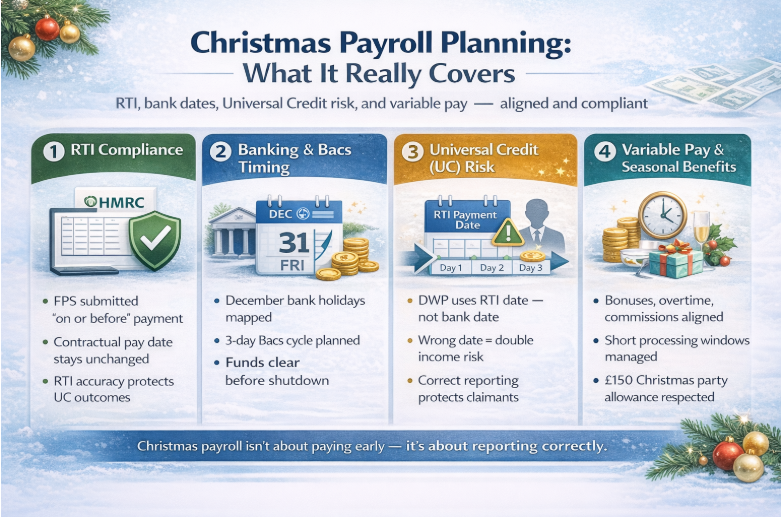
Comprehensive Christmas payroll planning extends far beyond simply pushing a payment through the bank a week early. It encompasses four critical pillars:
- RTI Compliance: Ensuring the Full Payment Submission (FPS) reflects the correct contractual pay date while still being submitted “on or before” the date staff can access funds. If your team needs a quick refresher on what FPS is and how RTI works operationally, use Lanop’s RTI and FPS FAQs.
- Banking & Bacs: Mapping out the 3-day Bacs cycle against December bank holidays to ensure funds clear on time.
- Universal Credit (UC) Protection: Understanding that DWP decisions are driven by the RTI payment date you report (not your bank statement). For a simple way to explain “bank holiday timing” to staff and directors, reference Lanop’s HMRC Christmas payments and Child Benefit timing guide.
- Variable Pay: Handling bonuses, overtime and commissions in a compressed processing window. Where employers also provide seasonal benefits (events, meals, or staff entertainment), align payroll reporting with the tax position under the HMRC £150 Christmas party allowance to avoid accidental taxable benefits.
Who this is for (SMEs, payroll managers, directors, outsourced payroll clients)
This technical briefing is designed for those accountable for UK payroll outcomes. Whether you are a Director of an SME overseeing internal finance, a Payroll Manager at a mid-sized firm, or an outsourced client coordinating with an advisor like Lanop, the risks remain the same. Many SMEs reduce December pressure by switching to fully managed payroll support or using a UK payroll service bureau.
If you have employees who receive Universal Credit, or if your business relies on rigid Bacs schedules, the following operational protocols are mandatory to avoid the “double pay” reporting trap that plagues many UK businesses every December.
The 60-second rule (early pay + RTI + UC risk in one paragraph)
If you pay early (for example,paying on 19 December instead of 31 December), you typically still report the contractual payday (31 December) as the RTI payment date on the FPS, submitted on or before the day staff can access funds. This is the core mechanism that prevents DWP systems from reading “two payments in one UC assessment period.” If your payroll software fields or process dates are unclear, get your setup validated via RTI payroll support before your December FPS goes in.
Key Terms You Must Get Right:
Payroll over Christmas vs “normal payroll” (why December is different)
A payroll over Christmas is distinct because the “date of payment” and the “date of reporting” often diverge. In a standard month, these dates are identical. In December, employers often bring the physical cash transfer forward to help staff with festive costs. However, from a regulatory perspective, the “payroll period” does not actually change.
FPS payment date (contractual pay date) – what it means in practice
The Association of Taxation Technicians’ FPS payment date (contractual pay date) refers to the date an employee would generally be paid if it weren’t for the Christmas break. If your employment contracts state that payday is the “last Friday of the month,” that is your contractual pay date. Even if you physically pay the money on the 18th of December, the RTI field for “Payment Date” must usually remain as the original contractual date.
“Paid early” vs “reported early” (the difference that prevents UC problems)
There is a vital distinction between the two. You “pay early” when the money is deposited into the employee’s bank account. You “report early” when you submit the FPS to HMRC before the deadline. The trick to compliance is ensuring that, while you may pay employees early for Christmas, the data inside that report still reflects the regular cycle. Using the wrong date in the FPS is the primary cause of early pay, which causes universal credit issue outcomes.
Mini Case Study:
A London-based retail boutique decided to pay staff early Christmas on December 15th instead of their usual 30th. They reported the 15th as the payment date on the FPS. Three Universal Credit employees had their January benefits cut to £0 because the DWP system identified two payments in a single assessment period. Lanop intervened by resubmitting corrected RTI data and providing letters for the DWP.
"We thought we were helpful, but the reporting error caused a massive crisis for our team's personal finances."
- Sarah J., Director of Apex Retail Boutique (London)
The Rules That Control Everything (RTI compliance)
Submit FPS on or before the payment date – what HMRC expects.
The foundational rule of RTI is that you must submit the FPS to the Association on or before the payment date. This means the report must reach HMRC before the employee has access to the funds. However, Christmas introduces a permanent “easement” to this rule.
RTI early payment reporting – what changes when you pay early
Under RTI early payment reporting protocols, HMRC allows (and requests) that employers who pay early for Christmas should report the usual payday in the “Payment Date” field of the FPS.
PAYE reporting early wages – what to report and what not to change
When PAYE reporting early wages, you must not change the tax period. If you are paying the “Month 9” salary early, it must remain reported as Month 9. Do not be tempted to shift the payment into a different tax month just because the bank transfer happened on the 19th of December.
HMRC RTI Christmas guidance – how to apply it in real payroll runs
The HMRC RTI Christmas guidance is designed to protect social security benefits. It explicitly states that if you pay early, you should report the regular payday on the FPS. For example, if your regular payday is 27th December 2025 (a Saturday) but you pay on Friday 19th December, you should report 27th December as the RTI payment date.
HMRC easement early December pay – when it applies and when it doesn’t
The Association of Taxation Technicians for HMRC has an easement in place for pay in early December; this is a long-standing rule. It applies specifically to the Christmas period. It does not apply if you decide to pay early in June or July for a summer holiday. It is a seasonal concession to prevent administrative chaos and protect Universal Credit claimants.
The Universal Credit Risk (Why employees get hit)
How does Universal Credit work with two payments in one assessment period?
The Association of Taxation Technicians’ “Technicians universal credit two payments in one assessment period” scenario is the “nightmare” of December payroll. UC assessment periods are unique to each claimant. If an employer reports two different FPS submissions with payment dates that both fall into an employee’s single 30-day UC window, the DWP software assumes the employee has doubled their income.
Universal credit payroll paid early – what employees experience
When a universal credit payroll paid early error occurs, the employee’s UC statement will show a “surplus” of earnings. This often leads to a pound-for-pound reduction in their benefit. For a low-income worker, receiving their salary early only to lose £500 in benefits in January can be financially devastating.
Early pay causes universal credit issues – the common triggers.
The most common trigger is an administrator mistakenly entering the “actual” date of the payment with the payment money (e.g., 20th December) into the payroll software’s “Pay Date” field, rather than the “contractual” date (e.g., 31st December). Even a one-day difference can push a payment into a different UC assessment window.
RTI payment date universal credit – how reported pay dates affect UC
The DWP receives data directly from the Universal Credit payroll feed via HMRC. They do not see your bank statement; they only know the date you typed into the FPS. Therefore, the RTI payment date universal credit link is the only thing that matters for benefit calculations.
Universal Credit Risk Control Checklist:
- Identify all staff currently receiving or applying for Universal Credit.
- Verify the “Contractual Pay Date” as per employment contracts.
- Cross-reference the bank holiday dates in December against the intended payment date.
- Brief to the payroll team on the “HMRC Easement“ regarding reporting dates.
- Ensure the payroll software is set to the contractual date, not the early payment date.
- Issue a memo to staff explaining that while they get paid early, their pay slip and HMRC record will show the expected date.
- Review “Year-to-Date” earnings to ensure no thresholds are accidentally tripped.
If you want a formal, documented review of this checklist against your payroll calendar, use a Christmas payroll compliance review.
Christmas Payroll Dates 2025/26 (Operational calendar)
Christmas payroll dates – building your December timeline
Planning your Christmas payroll dates requires working backwards from the last working day of the year. For 2025, Christmas Day (Thursday) and Boxing Day (Friday) are bank holidays. This means any Bacs payments intended for that week must be submitted significantly earlier.
Payroll bank holiday dates December – when “normal payday” is disrupted
The key bank holiday dates for December 2025 are Thursday 25th and Friday 26th. If your regular payday falls on these dates, or the weekend of the 27th/28th, you are legally and operationally required to adjust. Most employers move the payment to Wednesday, 24th December or earlier.
Bacs processing dates, Christmas – processing-day constraints and planning.
The Bacs processing dates Christmas schedule is unforgiving. Bacs is a 3-day cycle:
- Day 1: Input/Submission
- Day 2: Processing
- Day 3: Payment/Settlement
If you want staff to have cleared funds on Tuesday, 23rd December, your “Day 1” submission must be no later than Friday, 19th December.
Christmas payroll cut-off dates (timesheets, overtime, leavers, expenses)
Your Christmas payroll cut-off dates must be brought forward. If you usually accept timesheets until the 20th of the month, you may need to move this to the 12th or 15th to allow for early processing.
Internal checklist: what must be final before you can file early safely
- All new starter forms (P46/P45) are processed.
- Final overtime hours for the early period confirmed.
- Unpaid leave or sickness absences are recorded.
- Christmas bonus payroll amounts approved by directors.
- The bank account details for new staff are verified.
Execution Playbook (Step-by-step, no ambiguity)
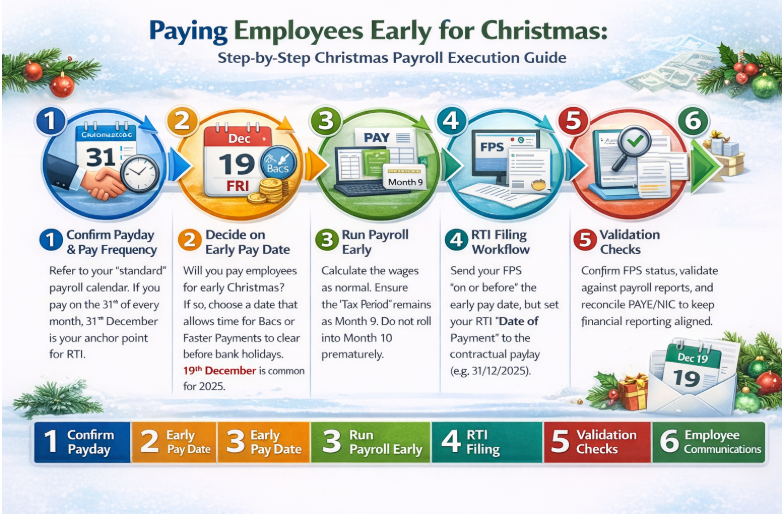
Step 1: Confirm the contractual payday and pay frequency
Refer to your “standard” payroll calendar. If you pay on the 31st of every month, 31st December is your anchor point for RTI.
Step 2: Decide whether you will pay employees early Christmas
Will you pay employees for early Christmas? If so, choose a date that allows enough time for Bacs or Faster Payments to clear before the bank holidays. Friday 19th December is a common choice for many UK SMEs in 2025.
Step 3: Run payroll early without breaking period logic
Calculate the wages as normal. Ensure that the “Tax Period” remains as Month 9. Do not let the software “roll” into Month 10 just because you are sitting at your desk on December 18th.
Step 4: RTI filing workflow (incl. RTI early payment reporting)
When you pay staff early for Christmas, your FPS submission should be sent “on or before” the day the money leaves your account. However, and this is the most critical step, the “Date of Payment” field inside that FPS must be the contractual payday (e.g., 31/12/2025).
Step 5: Validation checks (pay slips, FPS receipts, reconciliation)
Confirm the FPS receipt status, validate totals against payroll reports, and reconcile PAYE/NIC. For businesses where payroll needs to match management reporting cleanly, aligning payroll outputs with bookkeeping reduces year-end clean-up, see Lanop’s bookkeeping integration approach.
Step 6: Employee communications (especially UC claimants)
Inform staff: “You will receive your wages on [Early Date]. Your pay slip will show the date [Contractual Date] to ensure your Universal Credit and Tax records remain accurate.”
Mini Case Study:
A construction firm with 40 weekly-paid contractors needed to ensure all staff were paid before the site closed on December 20th. Lanop managed the Bacs processing dates Christmas calendar, ensuring the FPS was submitted on the 18th but dated for the 26th.
"Lanop's timeline meant we didn't have a single late payment or a single complaint from the guys about their benefits."
- Mark T., Operations Manager at Forge Construction Ltd (Birmingham)
Scenario Matrix (The “map” that prevents missed cases)
| Scenario | Physical Payment Date | RTI Reported Date | Logic |
|---|---|---|---|
| Monthly Payroll | 19 Dec 2025 | 31 Dec 2025 | Use contractual date to protect UC. |
| Weekly (Friday) | 19 Dec 2025 | 26 Dec 2025 | 26th is a Bank Holiday; report the "normal" Friday. |
| 4-Weekly Pay | 18 Dec 2025 | 25 Dec 2025 | Crucial for Association of Taxation Technicians universal credit payroll paid early risks. |
| Bank Holiday Payday | 24 Dec 2025 | 25 Dec 2025 | HMRC easement applies. |
Monthly payroll – paid early vs reported contractual payday
For monthly staff, the goal is stability. Most accounting software handles this well if you manually override the “Payment Date” in the RTI header while keeping the “Process Date” the same.
Weekly/fortnightly payroll – year-end sequencing and deadlines
Weekly payrolls are more susceptible to “Week 53” issues. Ensure your Christmas payroll software settings account for whether there are 52 or 53 pay dates in the current tax year.
4-weekly payroll – repeated UC disruption patterns
Employees on 4-weekly cycles are at the highest risk of universal credit payroll issues because their pay dates naturally drift. Christmas acceleration can easily result in three “payment dates” falling into two UC periods if not reported as the contractual date.
Payday on bank holiday – what to report and when to submit FPS
If your payday falls exactly on 25th December, you are paying a day early (24th). Report the 25th on the FPS. This is the heart of the HMRC RTI Christmas guidance.
Multiple payments in December (bonus + salary) – when it causes UC spikes
If you pay a bonus on the 10th and salary on the 19th, and report them on these dates, the employee will have a massive “income spike” in one UC period. It is often better to aggregate these into one “virtual” payment date.
Wage advances before Christmas – PAYE/NIC + RTI treatment
A wage advance is generally treated as a payment on account of earnings. Under RTI, you should technically report it when paid. To avoid UC issues, many employers treat small advances as loans, but this is a complex area. Consult Lanop before proceeding.
Christmas Bonus and Variable Pay (High-risk add-ons)
Christmas bonus payroll options (separate vs combined run)
You have two main options for a Christmas bonus payroll:
- Combined: Add the bonus to the December salary. This is the simplest for RTI.
- Separate: Run a standalone bonus payroll. Warning: This can trigger a second FPS, which increases the risk of universal credit payroll paid early errors.
Overtime not final – compliant options for estimated vs later true-up
Since you are processing payroll for Christmas early, you might not have the final overtime figures for the last week of December.
- Option A: Pay basic salary early and pay December overtime in January.
- Option B: Estimate overtime and “true-up” (adjust) in the January run.
Commission/irregular pay timing – avoiding accidental “double payment” impact
If commission is paid on a different cycle, try to align the “Reported Date” with the main salary run to keep the employee’s RTI record clean.
Statutory Payments During Christmas (SSP/SMP/SPP/SAP)
Statutory pay in December – what changes (and what doesn’t)
Statutory payments like SSP (Sick Pay) or SMP (Maternity Pay) are calculated based on average weekly earnings. Processing payroll over Christmas early doesn’t change the entitlement, but it can make the calculations tricky if the “qualifying week” falls during the office closure.
Early processing impact on RTI dates and employee outcomes
Even for statutory pay, the RTI payment date remains at the anchor. Ensure that your software doesn’t cut off a maternity payment early just because you are running the payroll on the 15th of the month.
Christmas Payroll Compliance Risks (Controls)
Top compliance risks (RTI timing, pay date mismatch, bank delays, UC impact)
The highest risk is reporting a pay date that creates a UC distortion. The second risk is missing settlement deadlines (especially Bacs), causing late wage payments into the New Year. If you are deciding whether your current model can handle December pressure, use our guide on service bureau vs in-house payroll comparison to benchmark risk, cost, and control.
How Lanop Can Help (Christmas Payroll 2025/26 Support)
At Lanop Business & Tax Advisors, we provide senior technical oversight to ensure your festive pay run is a benefit to your staff rather than a compliance burden. Our team mitigates the operational friction between early bank transfers and HMRC reporting, ensuring your business remains fully aligned with the Association of Taxation Technicians for HMRC easement early December pay protocols. By managing the complexities of universal credit payroll and RTI date headers, we protect your employees’ benefits and your company from reporting penalties.
- Christmas payroll readiness review: A full audit of pay dates, RTI fields, and UC risk factors to ensure your Christmas payroll UK 2025/26 logic is bulletproof.
- Payroll calendar and cut-off setup: Bespoke mapping of your SME’s schedule against all Bacs processing dates, Christmas requirements and bank holidays.
- RTI submission assurance: Validation of the Association of Taxation Technicians’ FPS payment date (contractual pay date) to prevent reporting mismatches.
- Universal Credit risk mitigation: Technical reporting and employee comms packs to prevent accidental early pay causes universal credit issue outcomes.
- Christmas bonus and variable pay handling: Expert processing of Christmas bonus payroll, overtime, and commissions to ensure tax-compliant results.
- Fix-forward corrections: Rapid management of PAYE reporting early wages remediation and evidence packs if an error has already been filed.
- Holiday period payroll cover: Professional continuity to ensure your payroll Christmas run is completed on time while your internal team is on leave.
Conclusion
Managing the Christmas payroll effectively is a hallmark of the finance department. By prioritizing the contractual pay date in your RTI filings and respecting the rigid Bacs processing windows, you protect both your company’s compliance record and your employees’ financial wellbeing.
FAQs
If I pay wages early at Christmas, what exact RTI FPS “payment date” must I report?
You should report on the regular, contractual payday (e.g., 31st December) to comply with HMRC RTI Christmas guidance.
If I pay early but keep the usual payday, can I report the contractual payday on the FPS?
Yes. In fact, HMRC requires this to protect employees from early pay causes of universal credit issue scenarios.
If payday falls on 25–26 December or 1 January (UK bank holidays), what pay date should be used for RTI?
Use the date you would have paid if it weren’t a bank holiday (e.g., the 25th), even if you physically pay on the 24th.
By what time must the FPS be submitted when wages are paid early (HMRC “on or before” rule)?
The Association of Taxation Technicians submits FPS on or before payment date rule means it must be submitted by the time the employees receive the money.
Does pay early create two salary payments in one Universal Credit assessment period?
Only if you report the early date on the FPS. If you report the contractual date, it counts as one payment per month.
What is the safest payroll approach to prevent Universal Credit deductions when paying early?
Align your RTI payment date with universal credit reporting with the employee’s usual monthly cycle.
How do I correct an FPS submitted with the wrong pay date (amend FPS or use an EPS)?
You must usually submit an additional FPS with the correct date. An EPS will not fix a payment date error for an individual.
If payroll is run early, can I keep the same pay period start/end dates on pay slips?
Yes. The pay period (e.g., 1st–31st Dec) remains the same even if the processing happens on the 15th.
If I pay a Christmas bonus early, should it be included in the normal payroll run or processed separately?
Including it in the normal run is safer for universal credit payroll compliance as it avoids a second “payment date” record.
If overtime is not final before early payroll, how should I pay estimated overtime compliantly?
Pay a “Payment on Account” and reconcile the exact hours in the January payroll run.
If SSP/SMP/SPP/SAP falls in the Christmas period, does early processing change the RTI reporting date?
No. The RTI payment date remains on the contractual payday.
If I pay a wage advance before Christmas, is it treated as earnings for PAYE/NIC and RTI at the time of payment?
Technically, yes. However, small advances are often handled as loans to avoid payroll RTI early payment reporting complexity. Consult with an advisor.
What are the UK Bacs processing-day cut-offs that can delay Christmas wage payments?
Bacs requires 3 working days. For a Wednesday 24th payment, you must submit by Friday 19th (due to the weekend).
If wages are paid early, does the employer’s PAYE/NIC payment deadline to HMRC change?
No. Your deadline for paying HMRC remains the 22nd (electronic) of the following month (January).
What are the top Christmas payroll compliance risks and how do I avoid them?
The top risks are universal credit payroll paid early errors and missing Bacs deadlines. Avoid them with a written timeline.
Can I submit the FPS early because payroll staff are on leave, and how early is it acceptable?
Yes, you can submit as soon as the payroll is finalized. HMRC allows for early submissions.
If an employee leaves, starts, or has a tax code change after I file early, what do I do without breaking RTI rules?
You must submit an “Additional FPS” to update HMRC with the new information before the contractual payday.
If I pay staff early in December, do I still run a normal January payroll on the usual date, or does it shift the cycle?
You return to the normal cycle in January. Paying early in December is a one-off exception.
If I make a separate supplementary payment (commission/bonus) in December, will it trigger UC issues even if the main payroll is reported correctly?
Yes, if it results in two FPS submissions with two different dates in one UC assessment period.
If pay is sent by Faster Payments instead of Bacs, does that change what date I should report on the FPS?
No. The reporting rule for the RTI payment date remains in the contractual payday.