Introduction
Whether you are self-employed, a company director, or a landlord, proving your income for a mortgage involves more than showing a bank statement. Lenders need official, verifiable proof of what you have declared to HMRC. In the UK, that document is the SA302, officially called the Tax Calculation document.
Knowing how to obtain an SA302 online is a skill that can make or break a property transaction. This guide walks you through the entire process, from understanding what the document is to fixing it when it does not appear.
Quick Answer
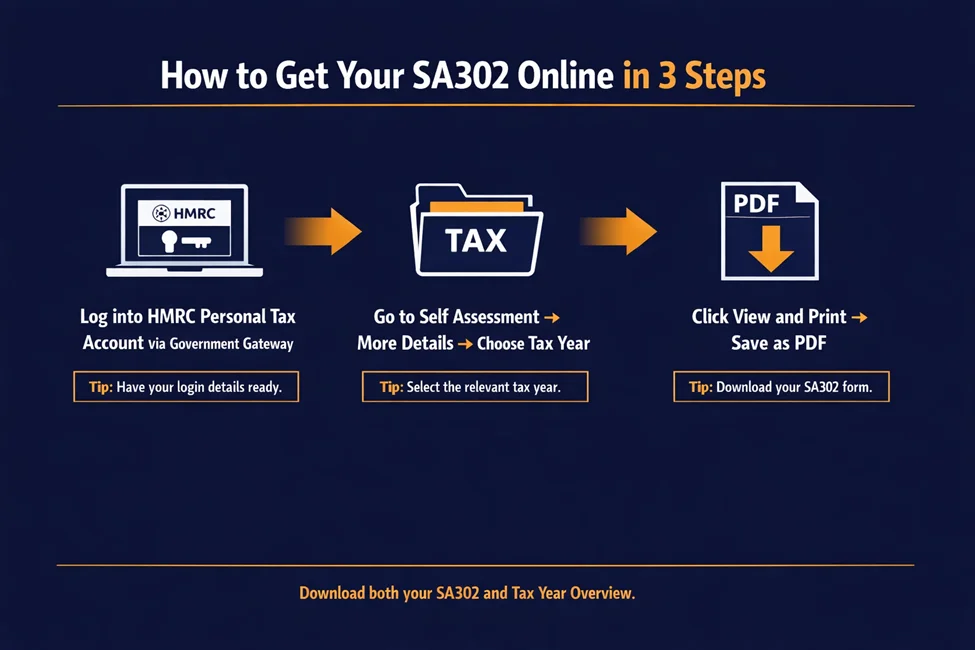
To obtain an SA302 online, log in to your HMRC Personal Tax Account using your Government Gateway credentials. Go to the Self-Assessment section, select “More details about your Self-Assessment returns and payments”, then choose the relevant tax year. From there, you can view, download, and print your SA302 as a PDF.
- What it is: An official HMRC document that summarises your taxable income and the tax due for a specific tax year.
- Who needs it: Self-employed individuals, freelancers, landlords, and company directors applying for mortgages, remortgages, or visas.
- Time to download: Around 5–10 minutes, as long as you submitted your tax return at least 72 hours earlier.
What Is an SA302 and Why Does It Matter?
An SA302 is the document HMRC produces based on your Self Assessment tax return. For lenders, it is non-negotiable proof that you have honestly declared your earnings.
What Information Does an SA302 Show?
The SA302 gives a full breakdown of your taxable earnings, including:
- Profits from self-employment as a sole trader
- Income from partnership businesses
- Dividends from company shares
- Rental income from land and property
- Salary from employment
- Total income and the final tax liability owed to HMRC
SA302 vs Tax Year Overview: What Is the Difference?
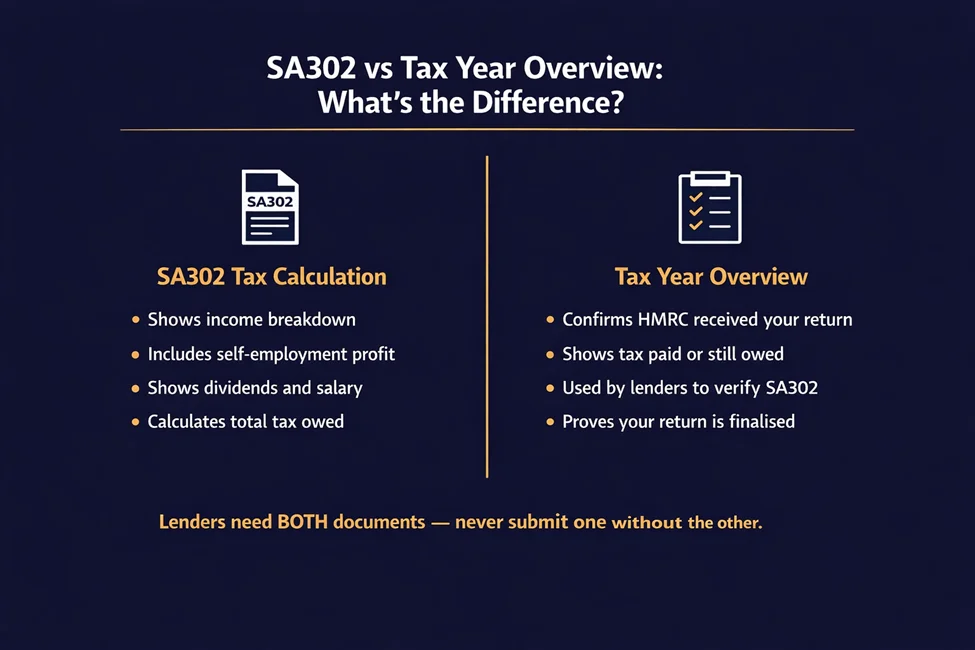
The SA302 alone is rarely enough. When you obtain an SA302 online, you almost always need to download two separate documents:
- SA302 (Tax Calculation): Shows how your tax was calculated based on your declared income.
- Tax Year Overview: Confirms HMRC received your tax return and shows the amount of tax paid or still owed for that year.
Lenders use the Tax Year Overview to verify that the figures on your SA302 match HMRC’s official records.
Who Needs an SA302 in 2026?
You will need to get an SA302 online if you fall into any of these categories.
Self-employed borrowers. As a sole trader or freelancer, you have no traditional payslips. The SA302 acts as your official income certificate.
Company directors. Even if you receive a salary through PAYE, lenders need the SA302 to verify any dividend payments and director’s bonuses declared through Self Assessment. Our limited company accounting team can help you stay on top of this.
Visa applicants. For the SA302 for UK visa requirements, the Home Office requires proof of financial standing. The SA302 provides official evidence that you meet the required income thresholds. If you need support with income documentation as an overseas national, our accounting for immigrants service can help.
Remortgage applicants. When switching lenders or releasing equity, lenders require updated documentation to confirm your income has not dropped since your last application. Landlords in particular often face this when refinancing property portfolios.
How Long Is an SA302 Valid?
Lenders typically want the most recent documents available. An SA302 is generally accepted for up to 18 months, but most mortgage lenders prefer the latest one, for example, the one covering the tax year ending 5 April 2026.
How Do You Obtain an SA302 Online? Step-by-Step
Following this process ensures you have the correct documents in the format lenders expect.
Before You Start: Requirements Checklist
You cannot generate an SA302 until HMRC has fully processed your tax return.
- Government Gateway login: You need your User ID and password.
- Submitted tax return: The return must be filed for the relevant year.
- Processing completed: Wait at least 72 hours after submitting an online return before trying to download.
Step 1: Log in to Your Personal Tax Account
Go to the official GOV. Visit the UK website and log in to your Personal Tax Account. If you do not have a Government Gateway ID, you will need to register for one. This takes a few days because HMRC sends activation codes by post.
Step 2: Navigate to the Tax Calculation Section
On your dashboard, select Self Assessment, then click “More details about your Self Assessment returns and payments”. From there, choose the tax year you need.
Step 3: Download Your SA302 PDF
Click “View and print your calculation”, then “Print your full calculation”. Choose “Save as PDF” rather than printing to paper. This gives you a digital file that is easy to upload to mortgage portals.
Do not forget to return to the previous menu and select “View and print your tax year overview”. This second document is just as important as the SA302 itself.
What If an Accountant Filed Your Return?
If a professional filed on your behalf, the process for getting your SA302 online may differ slightly.
Many accountants use agent software to submit returns. This means the SA302 figures might not appear immediately in your personal HMRC portal, because the calculations were generated by the accountant’s software rather than HMRC’s own system.
You can still access the Tax Year Overview yourself through your portal. For the SA302, you may need to ask your accountant for the HMRC-approved PDF directly. Getting an SA302 from your accountant is the most common way for self-employed mortgage applicants to obtain a mortgage. They can produce a compliant document from their software, saving you time on the HMRC website.
How Long Does It Take to Get an SA302?
The timing depends on how and when you filed your return.
Instant download. If you filed online and waited the required 72 hours, you can download the PDF in minutes.
Processing delays near the deadline. If you submit close to the 31 January deadline, HMRC’s systems can become overloaded, slowing document generation.
Paper return timelines. If you filed a paper return, you cannot get an SA302 online. You will need to call HMRC and ask them to post it to you, which can take up to two weeks.
Amended return delays. If you have amended your tax return, you must wait for HMRC to process the changes before a new, accurate SA302 is produced.
Why Is Your SA302 Not Showing Online?
It is common to hit problems when trying to get an SA302 online. Here are the most frequent causes and how to fix them.
Return not processed. You submitted within the last 72 hours. Check the Return Status in your account. If it says “Received” rather than “Processed”, you simply need to wait.
Missing tax year submission. You have not filed for the year you need. You cannot download a document for a year without submitting a return.
Account access issues. You have forgotten your Gateway ID or password. Use the GOV—UK recovery process to regain access.
Payment adjustments. A recent payment or refund is being processed, which may temporarily lock the document.
If more than a week has passed since submission and the document is still unavailable, contact the HMRC Self Assessment helpline. If you are also dealing with an HMRC tax investigation, our advisors can support you through both processes.
What should I do if I have an urgent mortgage deadline? Tell your mortgage broker immediately. They can often advise on using alternative documents or liaise with the lender’s underwriter to request an extension.
SA302 for Mortgages, Remortgages, and Visas
Lenders use these documents to calculate affordability based on your net profit, not your turnover.
What Are the SA302 Mortgage Requirements in the UK?
Most lenders ask for the SA302 and Tax Year Overview for the last two to three years. This lets them check whether your income is consistent, growing, or declining. Our tax planning team can help you structure your income to present well to lenders.
How Do Lenders Verify an SA302’s Authenticity?
Lenders cross-reference the figures on your SA302 with the Tax Year Overview. Some also run a fraud check on the document itself to confirm it has not been altered.
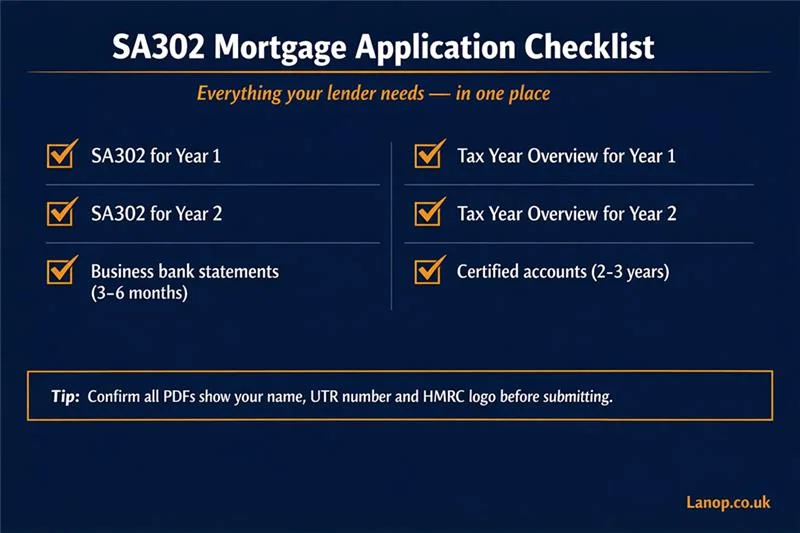
Alongside the SA302, lenders usually ask for:
- Business bank statements covering the last 3–6 months.
- A full set of certified accounts for the last 2–3 years.
- The Tax Year Overview to confirm the calculation is finalised.
Using an SA302 for Visa Applications
For immigration purposes, your SA302 must show that you meet the minimum income threshold required by the specific visa type.
If you have complex income, such as earnings from multiple businesses or complicated trust income, the SA302 may need to be supported by a letter from an accountant confirming your overall financial position. Our accounting for immigrants service regularly supports clients with exactly this.
Case Study: SA302 for a Self-Employed Mortgage Application
Client: Priya S., freelance graphic designer based in London. Situation: Priya had been self-employed for four years and was applying for her first mortgage. Her lender requested two years of SA302s and Tax Year Overviews, but she had filed her most recent return just 48 hours before her mortgage appointment.
Problem: The SA302 was not yet showing in her HMRC portal. Her previous accountant had also filed using agent software, meaning the SA302 for the prior year was not visible in her personal account either.
Solution: Lanop’s team retrieved both years’ SA302s directly from the agent portal, compiled them alongside her certified accounts and Tax Year Overviews into a single mortgage-ready pack, and liaised with the lender’s underwriter to confirm the documents were HMRC-compliant.
Result: Priya’s mortgage application moved forward without delay.
“I had no idea the SA302 and the Tax Year Overview were two different things. Lanop explained everything clearly, pulled the documents I needed, and sent them to my lender within the day. I would not have known where to start on my own.”
— Priya S., freelance designer, London
SA302 Evidence and Verification Checklist
Use this checklist to ensure your application goes through without delay.
What lenders check:
- Matching income figures: Do the figures on the SA302 match those in the Tax Year Overview?
- Consistency across years: Is your income growing, stable, or declining?
- Supporting documents: do your bank statements match the income declared on the SA302?
Submission checklist for borrowers:
Confirm all PDFs show your name, UTR, and HMRC logo
- Log in to the HMRC portal
- Download SA302 for Year 1
- Download Tax Year Overview for Year 1
- Download SA302 for Year 2
- Download Tax Year Overview for Year 2
- Confirm all PDFs show your name, UTR, and HMRC logo
What are the Alternatives If You Cannot obtain an SA302?
If you cannot get an SA302 online in time, some lenders will accept alternatives, though this depends entirely on their own policy.
- Tax Year Overview with the raw return. In some cases, lenders accept a Tax Year Overview combined with the original tax return (SA100) if the SA302 is temporarily unavailable.
- Accountant certification letter. A letter signed by a chartered accountant confirming your income is often accepted as a substitute, particularly for self-employed mortgage applicants who filed very recently.
- Company accounts. For limited company directors, the last two years of signed company accounts may be sufficient, provided a statement of personal dividends received accompanies them.
Alternatives are usually only accepted if you can show that you have submitted your tax return and are simply waiting for HMRC to complete processing.
Missing Years, Corrections, and Replacements
How Do You Obtain an SA302 for Older Tax Years?
HMRC keeps the last four years of tax calculations available online. If you need a document for a year before that, you will have to call HMRC and request it, which may take some time to arrive.
What If the Figures on My SA302 Are Wrong?
You must submit an amended tax return to correct the figures. Once HMRC processes the amendment, a new SA302 is generated automatically.
How Do You Replace a Lost SA302?
If you have lost your copies, you can simply download a replacement from your HMRC Personal Tax Account. You do not need to order a new one from HMRC unless you cannot access your account.
How Does Late Filing Affect a Mortgage Application?
Filing late can seriously damage your mortgage prospects. Lenders treat it as a sign of financial mismanagement and may refuse the application outright. If you have outstanding returns, our Self Assessment team can help you get up to date quickly.
How Much Does It Cost to Obtain an SA302?
From HMRC: free. Downloading your SA302 from your Personal Tax Account costs nothing.
From an accountant: a possible service fee. Some accountants include this as part of their annual package. Others charge a small administrative fee if they need to generate and certify documents specifically for a mortgage application.
Common Mistakes That Delay Mortgage Approval
Submitting the SA302 without the Tax Year Overview. This is the single most common cause of delays. Lenders cannot verify the calculation without it.
Using an outdated SA302. A document covering a tax year that is too old will prompt the lender to ask for updated information, slowing everything down.
Mismatched income figures. If you amended your return but submitted an old SA302, the figures will not match the Tax Year Overview. This usually leads to an automatic rejection.
Missing supporting accounts. For complex cases or missing years, lenders often need full certified accounts, not just the summary provided by the SA302. Our bookkeeping and accounts preparation service ensures your records are always lender-ready.
How Lanop Business & Tax Advisors Can Help
At Lanop, we know that securing a mortgage is a high-stakes process. Our team helps you get the paperwork right the first time.
- Retrieving missing SA302s. We can help you navigate the HMRC portal or liaise with HMRC directly to retrieve historical documents.
- Correcting tax filings. If your income has changed or a return needs to be amended to reflect your true earnings for a lender, we handle corrections quickly and accurately.
- Preparing mortgage-ready income packs. We compile all necessary documents, including SA302s, Tax Year Overviews, and certified accounts, into a single pack ready for your lender.
- Liaising with lenders and underwriters. If a lender has detailed questions about your income structure, our advisors can speak with them directly to provide professional clarification.
Contact Lanop today to get your SA302 documents sorted without stress.
Conclusion
Knowing how to obtain an SA302 online is essential for any self-employed professional or director in the UK. By following the steps in this guide, you can get the accurate, official documentation that lenders and visa authorities require.
Always download both the SA302 and the Tax Year Overview, and keep digital copies in a secure location for future use. If you need help with your tax returns or professional certification for a mortgage application, Lanop Business & Tax Advisors is here to help.
FAQ
Log in to your HMRC Personal Tax Account via the Government Gateway, go to Self Assessment, and select “More details about your Self Assessment returns and payments”. Choose the year you need and click “View and print your calculation”.
If you filed online, the document is usually available 72 hours after submission. If you filed a paper return, it can take up to two weeks to arrive by post.
You do not need to submit separate documents to request it. You simply need to have already filed your Self Assessment tax return. To use it for a mortgage, you also need the Tax Year Overview alongside the SA302.
Yes. It is the standard document required by almost all UK mortgage lenders to verify self-employed income.
Lenders cross-reference the SA302 with the Tax Year Overview and may use third-party tools to check the figures directly with HMRC.
Yes. Accountants can download the SA302 and Tax Year Overview using their agent software or provide a calculation generated by their commercial software.
Submit an amended tax return to HMRC. Once the amendment is processed, a corrected SA302 will be issued. Our Self Assessment team can handle amendments on your behalf.
Most lenders ask for the two most recent tax years, though some may request three.
Yes. The Home Office accepts the SA302 and Tax Year Overview as official proof of income for self-employed applicants. Visit our accounting for immigrants page for more on supporting documentation.
Substitutes include an accountant’s certification letter, certified company accounts, and, in some cases, business bank statements.
Download a replacement directly from your HMRC Personal Tax Account.
No. Downloading from GOV.UK is free.
Yes. The SA302 includes a breakdown of any dividend income declared through Self Assessment. Our limited company accounting team can help directors structure and document this correctly.
Most lenders require documents less than 18 months old, but prefer the most recent tax year available.
Generally, no. You need to wait for the standard 72-hour processing period after submission. If you have an urgent deadline, contact Lanop, and we can advise on the next steps.