
Why SA302 Rejections Happen
A mortgage delay puts you under real pressure. For many self-employed people, one document causes most of the trouble: the SA302.
Your paperwork may be fine. But the lender pauses your case and asks for more.
Lenders flag your SA302 evidence if they notice even small errors. They do not just look at profit. They check your SA302 against your Tax Year Overview and bank records.
Common causes include:
- Mismatched figures
- Missing tax years
- Amended returns
- Unpaid tax balances
These are the most frequent SA302 issues. When time is short, delays can put a home purchase or visa at risk. Accurate SA302 proof is vital to get approval without delay.
What Is an SA302?
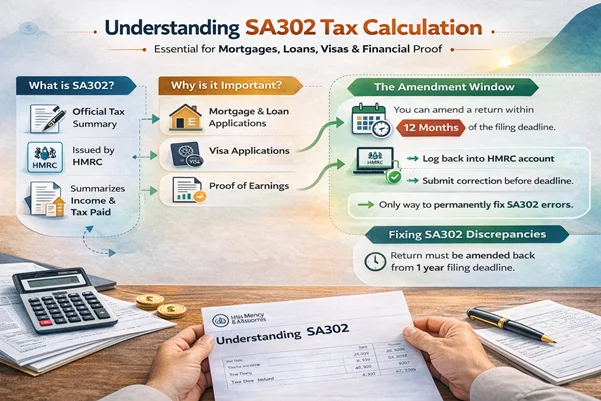
An SA302 is an official tax note from HMRC. HMRC sends it after they process your Self-Assessment return. It shows the income you declared and the tax due for that year.
| Definition: An SA302 is a tax note from HMRC. It confirms the income and tax in your Self-Assessment return. Lenders use it as proof of yearly earnings for self-employed people. |
The document usually includes:
- Total taxable income
- Breakdown of income sources
- Income tax owed
- National Insurance due
- Student loan amounts, where relevant
Most lenders ask for the last two or three years of SA302s. They use these to work out your average income and check your finances are stable.
SA302 vs Tax Calculation
Many people mix up the SA302 and the tax calculation. Your software makes a draft before you file. This draft is not the official HMRC version.
Once you file and HMRC processes your return, they issue the SA302. Sending a draft instead of the real one is a common cause of rejection.
Lenders also need the Tax Year Overview. This is a separate HMRC record. It shows whether the tax on your SA302 has been paid or is still owed.
In short:
- The SA302 shows what you owe.
- The Tax Year Overview shows what you have paid.
Both are needed to give full income proof.
Why Lenders Reject SA302?
If your SA302 gets rejected, the issue is usually about data not matching. Lenders check three key records: your SA302, Tax Year Overview, and bank statements. If the numbers differ, your case goes to manual review. This slows down approval.
Here are the most common reasons for rejection.
1. SA302 and Tax Year Overview Do Not Match
A gap between the SA302 and the Tax Year Overview is one of the top triggers. For example, the SA302 may show £5,000 tax due, but the Overview shows £5,500. This gap often comes from:
- Late filing fees
- Interest charges
- Payments on account
- Small unpaid amounts
Lenders may see this gap as hidden debt. To fix the SA302 error, check your HMRC account statement. Make sure all payments match before you send the documents. Clear records reduce lender concern.
2. SA302 Missing Tax Year
Most lenders want two or three years of tax records. If one year is missing, you have a gap in your SA302 history. This can happen when:
- The return has not been filed yet
- The return was sent but not processed
- A system error occurred during filing
- The agent’s software has not synced with HMRC
Without full records, lenders cannot work out your average income. Confirm that HMRC received and accepted your return.
3. Recently Filed Return Not Showing
Filing just before a mortgage can create timing issues. HMRC takes up to 72 hours to create the SA302 after you file. If you log in too soon, the portal may say ‘information not available.’ This is normal. It just means the system is still working. Plan your filing ahead of time to avoid delays.
4. Accountant Version Rejected
Some lenders accept figures from software. Others need the HMRC PDF. If your accountant uses their own software, the output may not have the official HMRC header.
To avoid rejection:
- Download the official PDF from your Personal Tax Account
- Include the matching Tax Year Overview
- Make sure both cover the same tax year
Using the right format avoids extra queries.
5. Unpaid Tax Showing on Overview
Even if your SA302 is correct, an unpaid balance on the Tax Year Overview can block approval. Lenders treat unpaid tax as a priority debt.
Common reasons include:
- Unpaid income tax
- Late payment fees
- Time to Pay deals with HMRC
Good SA302 evidence needs both correct income figures and a clear tax status. Paying any balance and sending an updated Overview helps your case.
6. Filing Close to Mortgage Application
A big jump in income just before you apply may raise concerns. Lenders look at income trends over several years. If you need to amend your SA302, timing matters. A last-minute change during an active review can trigger extra checks. Send support documents and a clear written note to manage this.
How to Get SA302 Quickly
When you are on a deadline, speed is key. The fastest route is the HMRC online portal. Knowing how to get your SA302 online can prevent mortgage or visa delays.
The Online Method (Recommended)
Your Personal Tax Account is the quickest option. Follow these steps:
- Log in to your HMRC Government Gateway account.
- Select ‘Self-Assessment.’
- Choose ‘More Self-Assessment details.’
- Click ‘Get your SA302 tax calculation.’
- Pick the tax year and save the official PDF.
The online version is ready within 72 hours of filing. This is the official HMRC version most lenders require.
The HMRC Request Process (Postal)
If you cannot access your account online, contact HMRC directly. They will post a copy to your address on file.
Postal copies take 10 to 14 working days. This is too slow for most mortgage or visa deadlines. Regaining online access is a much faster option.
How to Correct or Amend SA302
Errors happen. You may have entered the wrong dividend amount or missed an expense. You cannot edit the SA302 PDF. You must correct the tax return itself.
The Amendment Window
You can change a return within 12 months of the filing date. Log back in and submit the fix. This is the only way to get a permanent SA302 correction.
Timeline and Risk
After you submit a change, the system takes time to update. Lenders will see that you made a change. They will often ask why.
If your profit went up a lot, they may ask for proof. Contracts or invoices can help support the new figures.
Replacing a Lost or Unavailable SA302
If you have lost your SA302, the right fix depends on how you filed your return.
If your accountant filed it:
- They likely have a copy saved in their software.
- They can send it quickly if needed.
- But some lenders only accept the official HMRC version from your online account.
If you filed it yourself:
- Recover your Government Gateway login through HMRC.
- Complete the ID checks required.
- Then download your SA302 from your Personal Tax Account.
If online access is not working, HMRC can send new login details by post. This takes up to 14 days and may not suit urgent cases.
Getting back into your online account is the fastest and most reliable option.
SA302 for Specific Situations
1. SA302 for Mortgage Applications
Lenders usually want two years of SA302s. They take an average to set your loan limit. If your most recent year shows a lower income, they may use that figure instead.
2. SA302 for Visa Applications
The Home Office is very strict about the SA302 for visa cases. If you run a limited company, your SA302 must match your company accounts and personal bank records exactly. Any gap can lead to refusal on grounds of dishonesty. This can have serious long-term legal effects.
3. SA302 for Landlord Referencing
Can a landlord ask for your tax records? Yes. Many letting agents ask for an SA302 if you are self-employed. It is often the only way to prove you can afford the rent without a regular salary.
4. SA302 for Small Business Directors
If you run a small company, your income may be a mix of salary and dividends. Your SA302 will show both. Lenders may also want to see the company’s retained profit. This shows the business can keep paying you at that level.
Alternatives to SA302
What if you have only traded for 10 months and have not yet filed a return? You will need another form of income proof.
- Certified Accounts: Accounts from a qualified accountant may work if the tax year has not ended.
- Earnings Letter: If you are a director, your accountant can write a Certificate of Earnings.
- Bank Statements: Some specialist lenders will check 12 months of deposits instead of tax records. Rates are often higher.
Most high-street banks will not accept these options. They need the HMRC document to pass their internal checks.
Common SA302 Mistakes That Delay Approval
Avoid these errors to keep your application on track:
- Only sending the calculation: Lenders nearly always need the Tax Year Overview, too.
- Wrong tax year: Send the exact years the lender asked for.
- Dividend mismatch: Your SA302 must match the dividend vouchers from your company.
- Filing too late: Filing 24 hours before your mortgage application will not give HMRC enough time.
- Amending without advice: Changing income figures just before a loan can trigger fraud alerts.
Summary Checklist for Approval
| Requirement | Action Needed |
| Document Type | Official HMRC PDF, not a software printout |
| Completeness | Send both SA302 and Tax Year Overview |
| Accuracy | Tax total must match on both documents |
| Balance | Tax Year Overview must show zero outstanding |
| Verification | Bank records must match your net income |
Case Study: Mortgage Delay Due to SA302 Mismatch
Client: Self-employed contractor
Issue: Mortgage put on hold
The lender found a gap between the SA302 and the Tax Year Overview. A payment on account had caused a small difference in the balance. The case was flagged for manual review, putting the sale at risk.
What We Did
- Checked the HMRC account statement
- Found the payment timing issue
- Sent a clear note to the lender
- Provided the corrected document pack
Result
The mortgage was approved within one week. The sale went ahead with no further issues.
Client Testimonial
“Our mortgage was delayed because the bank said our SA302 figures did not match HMRC records. Lanop reviewed everything, fixed the issue, and sent the right documents to the lender. Approval came back quickly. Their help made a stressful time much easier.”
Self-Employed Contractor, UK
How Lanop Business and Tax Advisors Can Help
SA302 issues often arise at the worst time. Mortgage offers, loan cases, and visa forms can stall due to small errors that are easy to miss. At Lanop Business and Tax Advisors, we fix these issues before they grow.
Our support includes:
- Checking SA302 and Tax Year Overview for errors
- Finding gaps and fixing them
- Handling formal changes where needed
- Managing the SA302 correction process with HMRC
- Preparing clear, lender-ready documents
- Writing notes to explain your case to lenders
We do not just download documents. We check the figures behind them. If a lender has raised a concern, we look at the root cause and give a clear, solid response.
For urgent cases, we act fast to protect your mortgage timeline. Our approach cuts rejection risk. It ensures your income records are correct and backed by HMRC data.
If your case has stalled due to SA302 issues, early expert help can stop further delay and restore lender trust.
Conclusion
When a mortgage or visa is at stake, you cannot wait for HMRC post or hope a lender skips a discrepancy. SA302 problems can be fixed. But you need to act fast and get expert help.
At Lanop, we bridge the gap between your tax records and your financial goals. We do not just do the books. We make sure your SA302 proof is strong enough to pass tough lender checks.
If your documents have been rejected or you are worried about an upcoming case, act now. We find the exact fix you need and move with the urgency your case demands.
FAQ
An SA302 is an official HMRC tax note. It confirms the income in your Self-Assessment return. Lenders use it to check your income level and ability to repay a loan.
If you have given your accountant access, they can log into HMRC and download it. Some lenders accept a software version, but most want the official HMRC PDF.
In some cases, lenders may accept company accounts, dividend vouchers, or a letter from your accountant. This depends on the lender’s own rules and your situation.
You cannot edit the SA302 itself. You must change the underlying tax return via your HMRC account. HMRC then issues a new SA302 once the change is processed.
You can only update it by formally changing the original return within HMRC’s allowed time. Backdating figures without filing a change is not allowed.
Online, it takes up to 72 hours after you file. Changes may take a few more days. Postal copies take 10 to 14 working days.
You may need your Tax Year Overview, HMRC account statement, updated accounts, and income records. These help match the figures and resolve any gaps.
They check if the return was filed and accepted. If not, they file the missing return or contact HMRC to resolve the issue.
Yes. Errors can delay or stop approval. Fixing SA302 issues early reduces the risk of refusal or a long review.
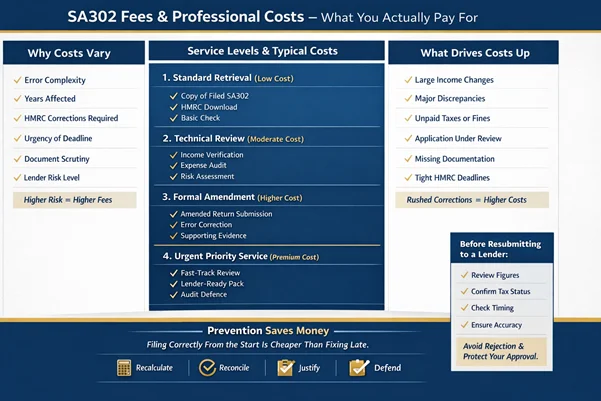
Fees depend on the work needed. Simple retrieval costs less than a full review or formal change. Urgent cases usually cost more.
Most lenders need both. The SA302 proves your income. The Overview proves your tax is paid. One alone is rarely enough.
Log in to your Personal Tax Account and download it again. If you cannot log in, recover your Government Gateway details through HMRC.
They check income totals, match figures with the Tax Year Overview, and confirm no unpaid balances or pending changes remain before sending to the lender.
The most frequent issues are draft versions, mismatched figures, missing years, unpaid balances, and last-minute changes to returns.
Send the official HMRC PDF with the matching Tax Year Overview. Add a clear written note where needed to support your case.