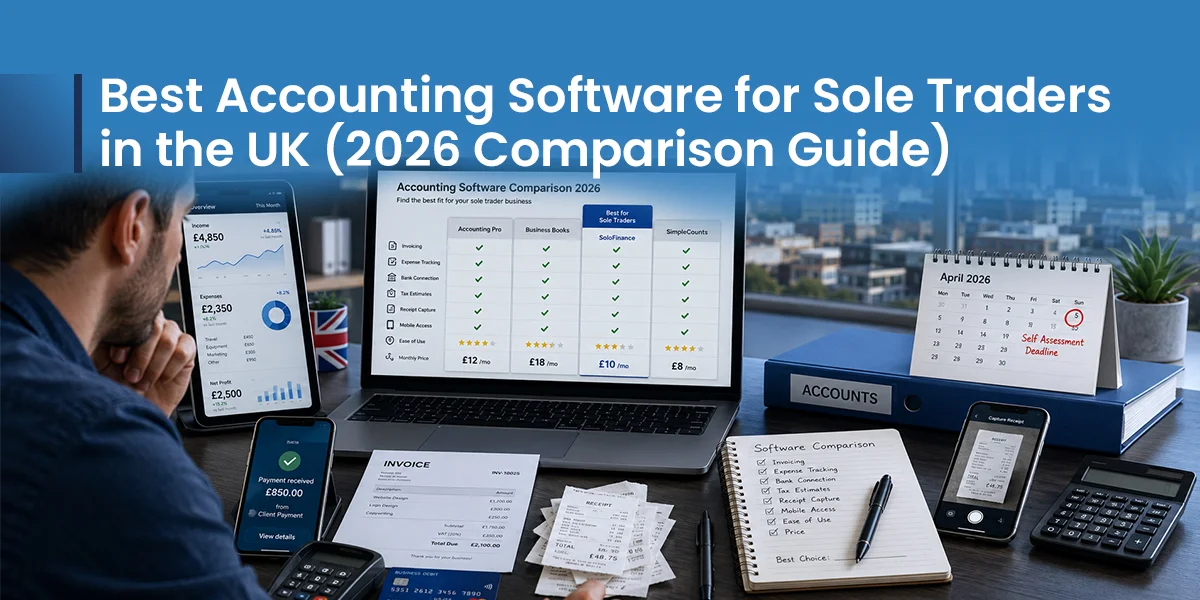
Picking the best accounting software for sole trader life matters more now. Making Tax Digital for Income Tax (MTD for ITSA) began its first compulsory phase on 6 April 2026. Your gross income decides when it applies to you.
Above £50,000 in self-employment or property income, you must keep digital records now. You must also send updates to HMRC every three months. This guide compares real pricing, real features, and true HMRC compatibility.
It helps you choose sole trader accounting software that fits your business. Not a generic top ten list. You may freelance, run a trade, sell online, or rent out property alongside a job. Whatever your setup, you will find a clear answer below.
Every price and feature here was checked against each provider’s own UK pricing page and cross-checked against HMRC’s list of recognised software. We review and refresh these figures regularly, since providers change plans and prices without much warning.
Why Sole Traders Need Accounting Software in 2026
Making Tax Digital changes how HMRC wants your records kept. One annual Self-Assessment is no longer enough. You now send four updates, every three months. A Final Declaration follows at year end.
The rollout happens in three phases. Each phase is based on gross income, not profit.
- From 6 April 2026: qualifying income above £50,000
- From 6 April 2027: qualifying income above £30,000
- From 6 April 2028: qualifying income above £20,000
HMRC expects around 780,000 people to join in the first wave. Another 970,000 will follow in 2027.
Miss a deadline and you do not get fined right away. HMRC uses a points system instead. Quarterly filers get one point per missed update. At four points, £200 fine lands. Every late update after that costs another £200. Points usually clear after 24 months of good behaviour.
Not everyone must join. HMRC exempts people who are digitally excluded, such as those without reliable internet access, along with a small number of other special cases. If you think an exemption applies to you, contact HMRC directly to check.
A spreadsheet alone no longer satisfies HMRC. It must link to HMRC through bridging software. That is why digital tax software UK wide has become the practical default for most sole traders.
Software also cuts stress. It stores receipts, tracks income, and does the maths for you. It gives you one less thing to worry about each month.
How to Choose the Best Accounting Software for Sole Traders
There is no single best answer to the question, what is the best accounting software for a sole trader. The right choice depends on your income, tax obligations, business setup, and how much support you need. Start by answering these key questions.
- What is your turnover? Are you close to the VAT threshold?
- Do you already work with an accountant? What software do they use?
- Do you need payroll, or mileage tracking for a van?
- Do you want simple software, or are you happy to learn more?
- Do you expect your business to grow soon?
Use this quick framework if you want a fast, practical starting point.
Best Places to Live in Italy for UK Expats
| Location | Property Cost | Schools | Transport Links | Best For |
|---|---|---|---|---|
| Milan | Very High | Excellent | Excellent | Business owners |
| Tuscany | High | Good | Good | Families, lifestyle |
| Rome | High | Good | Excellent | Culture, families |
| Lake Como | Very High | Limited | Good | Privacy, luxury |
| Naples | Moderate | Moderate | Good | Urban life, food |
| Calabria | Low | Limited | Growing | Value, retirees |
Essential Features Every Sole Trader Should Look For
- HMRC approval for Making Tax Digital, the baseline for any HMRC compatible accounting software
- Automatic bank feeds that match up on their own
- Mobile receipt capture, so paperwork never piles up
- Real time tax estimation, not just a year end guess
- Self-Assessment filing built into the same product
- Invoicing with built in payment reminders
- Mileage tracking, useful for any accounting software payroll integration if you employ staff too
- Free accountant access, so teamwork does not cost extra
Not every business needs every feature on this list. Match the list to your own workload, rather than chasing every add on you see online.
Detailed Reviews of the Best Accounting Software
Each review below covers price, key features, and who the software suits best. Read each one with your own business in mind.
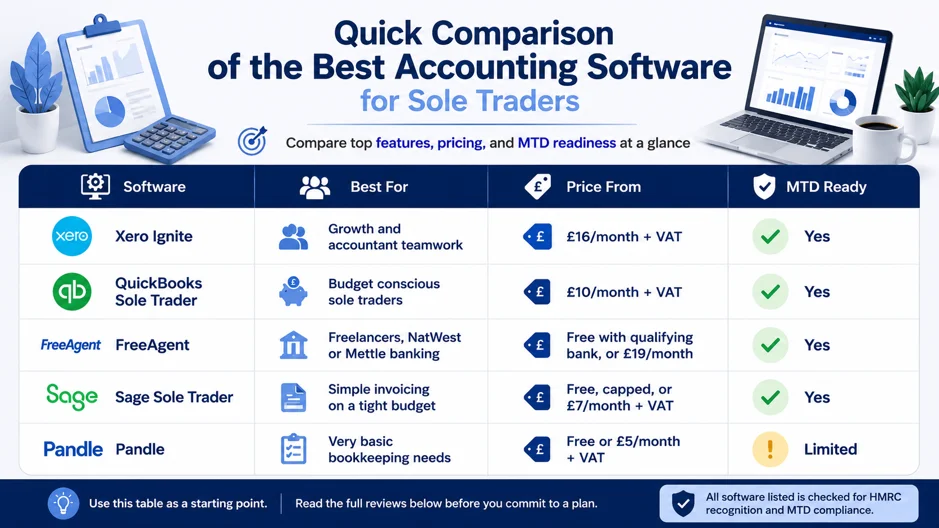
Xero Ignite
Xero is the platform most UK accountants already use. That matters at year end. Ignite starts at £16 a month plus VAT. It includes Making Tax Digital support, one payroll employee, and many add on apps.
- Pros: strong bank matching, a huge app range, trusted by most accountants
- Cons: pricier than budget rivals, some features sit unused by simple sole traders
Final verdict: choose Xero if your accountant already uses it, or if you expect fast growth.
QuickBooks Sole Trader
QuickBooks built this plan for the £20,000 to £100,000 sole trader market. It costs around £10 a month plus VAT. It covers the update rounds, the Final Declaration, and mobile expense tracking.
- Pros: cheapest full compliance route, strong mobile app, clean and simple interface
- Cons: not suited to VAT registered firms, unless you upgrade to Simple Start
Final verdict: a strong pick for solid digital tax software UK compliance, without paying too much.
FreeAgent
FreeAgent was built around Self-Assessment from day one. It costs around £19 a month. It is free if you bank with NatWest, Royal Bank of Scotland, Ulster Bank, or Mettle.
- Pros: excellent tax guidance, free for many bank customers, handles landlords and sole traders together
- Cons: less suited to fast growth or multi-currency work
Sage Sole Trader
Sage Sole Trader Free has no time limit and no banking condition. It caps you at five invoices and 25 sorted purchases a month. The paid tier removes those caps for £7 a month plus VAT.
- Pros: truly free entry point, a known brand, quick and easy setup
- Cons: newer to this market than rivals, caps bite fast once trade picks up
If you work in construction, ask about Construction Industry Scheme support before you commit. CIS tools are still rolling out across sole trader plans, so check the current feature list rather than assume it is included.
Feature Comparison
| Feature | Xero Ignite | QuickBooks Sole Trader | FreeAgent | Sage Sole Trader |
|---|---|---|---|---|
| Self-Assessment Filing | No | Yes | Yes | Yes |
| Payroll Included | 1 employee | Add-on | No | Add-on |
| Multi-Currency | Yes | No | No | No |
| Mobile App Rating | Strong | Strong | Good | Good |
| Free Trial Length | 30 days | 30 days | 30 days | Not required (free tier available) |
Use this table alongside the reviews above. A missing tick does not rule software out. It just means you may need a small add on to cover that gap.
Your line of work shapes the right pick more than most guides admit. Use the table below as your quick start point.
Best Accounting Software by Business Type
| Business Type | Recommended Software | Why It Fits |
|---|---|---|
| Freelancers and Consultants | FreeAgent | Clear tax estimates and simple invoicing |
| Tradespeople | QuickBooks Sole Trader | Mobile receipt capture and low monthly cost |
| Contractors | Xero Ignite | Accountant collaboration and payroll add-on |
| Online Sellers and Content Creators | QuickBooks or Xero | Handles multiple income streams |
| Sole Trader Plus Landlord | FreeAgent | Manages both business and property income together |
Best Free Accounting Software
For readers hunting the best free accounting software for sole trader route, three names stand out. FreeAgent is free through qualifying bank accounts. Sage Sole Trader Free never expires, but it caps invoices and transactions. Pandle offers a free tier for very light bookkeeping.
Free tools suit simple, low volume firms well. Once invoice counts grow, or transaction counts grow, the caps often force an upgrade.
Free vs Paid Accounting Software
| Factor | Free Software | Paid Software |
|---|---|---|
| Invoice Limits | Often capped | Unlimited on most plans |
| Bank Feeds | Basic or manual | Automatic on most banks |
| MTD Update Filing | Usually included | Always included |
| Support | Limited | Priority live support |
| Growth Headroom | Low | High |
Understanding Making Tax Digital
Making Tax Digital for Income Tax replaces the single annual return. Instead, you send ongoing digital reports. Qualifying income means your gross income from self-employment and property combined. This is worked out before expenses are deducted.
Once you are in scope, four quarterly updates fall due. These land roughly on 7 August, 7 November, 7 February, and 7 May. A Final Declaration follows by 31 January. HMRC will not issue penalty points for late quarterly updates in the first year. The Final Declaration deadline still applies though.
What HMRC Compatible Software Actually Means
Compatible software links straight to HMRC through an approved system. Your figures submit without manual retyping. HMRC keeps its own list of approved tools. Spreadsheets can still work, but only with bridging software creating that digital link.
Watch out for one detail many sole traders miss. Not every plan tier from a compatible provider covers quarterly filing. Some entry level tiers cover invoicing and bookkeeping only, and quarterly submission sits on a higher plan. Always check the specific plan you are buying, not just the brand name.
Do You Also Need VAT Software?
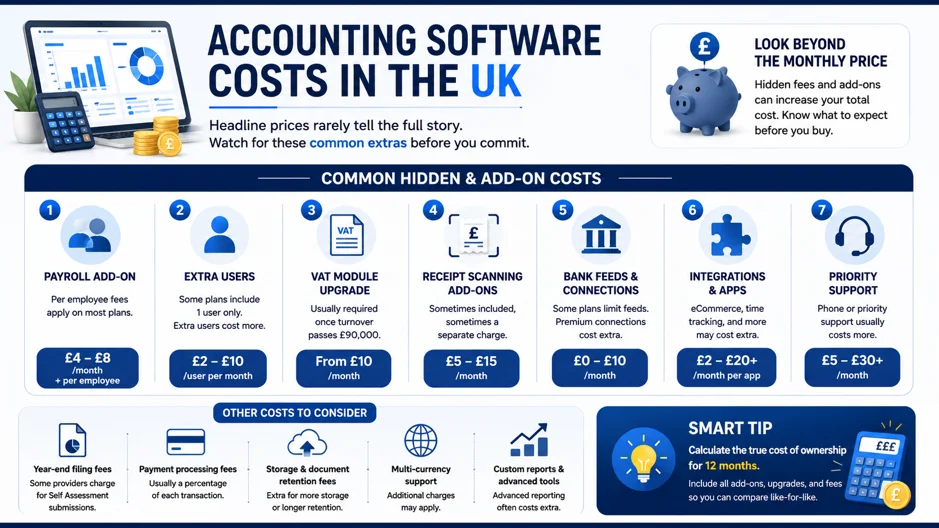
Making Tax Digital for Income Tax and VAT are separate rules. You can be caught by one, both, or neither. The current UK VAT registration threshold is £90,000 of taxable turnover in any rolling 12-month period, not a fixed tax year.
HMRC checks your total taxable turnover at the end of every month, looking back over the past 12 months. Cross £90,000 and you must register within 30 days. Many sole trader software tiers, including QuickBooks Sole Trader and basic FreeAgent plans, are not built for VAT filing. You would need to upgrade to a VAT ready plan, such as Xero Ignite or QuickBooks Simple Start, once registration becomes likely.
If you want the full detail on how the rolling 12-month test works and when voluntary registration makes sense, our dedicated VAT threshold guide covers it step by step.
Best Accounting Software for Beginners
QuickBooks Sole Trader and FreeAgent both suit beginners well. Their screens focus on what matters for Self-Assessment. You will not find yourself lost in accountant level menus you never need.
Both offer short, guided tours when you first sign up. These walk you through invoicing, expenses, and your first tax estimate.
Which Software Saves the Most Time
Bank feeds that update on their own save the most hours. AI receipt scanning helps too. Instead of typing every transaction by hand, the software reads your bank feed. It suggests a category, and you simply confirm it.
Set aside twenty minutes a week for bookkeeping. Do this consistently, and your year-end workload almost disappears.
Common Mistakes When Choosing Software
- Choosing on price alone, then hitting invoice or transaction caps mid-year
- Ignoring which platform your accountant already uses, which adds fees at year end
- Forgetting to check VAT readiness, then scrambling to upgrade under pressure
- Paying for payroll or multi-currency tools you will never touch
- Waiting until the MTD deadline before switching, instead of testing early
- Skipping the free trial and missing an obvious mismatch before you commit
Can You Still Use Excel?
Yes, in theory. Excel can still hold your records. But it must link to HMRC through bridging software first. This adds an extra step. It also adds a new place for errors to creep in. Most sole traders find dedicated software easier once the three-month filing starts.
Take your time with each step below. Rushing a switch is how errors slip in.
How to Switch Accounting Software Safely
- Export your existing data before cancelling anything
- Choose your new provider’s migration tool or guide
- Run both systems in parallel for one full month
- Check opening balances match exactly before going live
- Cancel the old plan only once every figure matches up
If you would rather hand this over entirely, switching accountants doesn’t have to mean doing the migration yourself.
Can Accounting Software Replace an Accountant?
No, and it was never meant to. Software handles daily bookkeeping, invoicing, and tax updates. An accountant still adds real value. They spot allowed costs, plan around tax, and check your Final Declaration before it goes in.
Working With an Accountant
Ask your accountant which platform they like before you buy anything. Most will invite you in as a helper at no extra cost. This speeds up year-end work. It often lowers their fees too.
A quick call before you buy can save weeks of back and forth later. It also builds trust from the very first quarter.
Cloud Accounting vs Desktop Software
Cloud accounting software UK wide now leads the field. There is good reason for that. It updates on its own for tax rule changes. It works from any device. It links straight to HMRC. Desktop software still exists, but it struggles to keep pace with MTD rules.
AI Features That Matter
Useful AI features include receipt scanning that reads amounts on its own. Sorting your spending gets smarter over time too. Cash flow forecasts flag a tight month before it shows up. Always glance over any AI suggested category rather than accepting it blindly.
Treat AI as a helpful assistant, not a final decision maker. You still hold the responsibility for what HMRC receives.
| Software | Receipt Scanning | Auto Categorising | Cash Flow Forecast |
|---|---|---|---|
| Xero Ignite | Yes | Yes | Yes (higher plans) |
| QuickBooks Sole Trader | Yes | Yes | Basic |
| FreeAgent | Yes | Yes | Basic |
| Sage Sole Trader | Limited (25 per month) | Yes | No |
Match your pick to where you are today. Not where you hope to be in five years.
Choose Software Based on Your Situation
- Just starting out: QuickBooks Sole Trader or Sage Sole Trader Free
- Approaching VAT registration: Xero or QuickBooks Simple Start
- Banking with NatWest or Mettle: FreeAgent, at no cost
- Working closely with an accountant: whatever platform they already use
- Planning to hire staff soon: Xero or Sage, for built in payroll
30-Day Setup Plan
Week 1: confirm your MTD phase and qualifying income
Week 1: shortlist two platforms based on this guide
Week 2: create an account and connect your bank feed
Week 2: import or enter your opening balances
Week 3: set up invoice templates and expense categories
Week 4: run a test quarterly update and review it with your accountant
Accounting Software Checklist
- Confirmed HMRC recognition for Making Tax Digital
- Pricing checked against your real invoice and transaction volume
- Bank feed compatible with your business account
- Accountant consulted on their preferred platform
- Trial period noted in your calendar, so it does not renew by surprise
- Mobile app tested for receipt capture on the go
Tick off each line before you commit. It only takes a day. It saves months of regret.
Frequently Asked Questions
There is no single best accounting software for sole traders pick for everyone. FreeAgent suits freelancers who want clear tax guidance. QuickBooks Sole Trader suits tight budgets. Xero suits traders planning to grow.
Xero, QuickBooks, FreeAgent, and Sage are all recognised for Making Tax Digital for Income Tax. Several smaller providers also appear on HMRC’s official software list.
FreeAgent is free with a qualifying NatWest, RBS, Ulster Bank, or Mettle account. Sage Sole Trader Free is free for anyone, though it has usage caps.
Yes. Subscription costs for business accounting software count as an allowable expense for sole traders.
No. It automates records and filing well. Tax planning and complex advice still need a qualified accountant.
Paid plans usually run from £7 to £16 a month plus VAT for sole trader tiers. Free options exist too, if your bank qualifies.
Not for MTD, at least not yet. That threshold arrives in April 2028. Many small traders still use software early, since good habits are easier to build before HMRC makes it compulsory.
One missed update rarely costs money straight away. Quarterly filers get a penalty point per miss, and a £200 fine only lands once you reach four points.
A Smarter Way to Choose:
The best accounting software for sole traders in the UK depends on your business needs, budget, and plans. If you’re just starting, a simple and affordable option may be all you need. As your business grows, look for software that supports VAT, automation, and accountant collaboration.
Before choosing, compare more than just the monthly price. Consider HMRC compatibility, Making Tax Digital readiness, ease of use, and long-term value to ensure the software fits your business.
If you’re unsure which option is right for you or need help with bookkeeping, Self-Assessment, VAT, or Making Tax Digital, Lanop’s chartered accountants are here to help. Contact us for a free consultation and get expert guidance tailored to your business.
Please note: Software prices, features, and HMRC requirements may change. Check the provider’s website and current HMRC guidance before subscribing.