
Running a factory is not like running a retail shop. You buy raw materials. You turn them into products. Then you sell them. Your accounting software must follow that whole journey.
Most owners spot the gap late. Stock counts stop matching the books. A job that looked healthy turns out to have lost money. This guide walks you through the best accounting software for manufacturing businesses, and how to pick the right one for the way you work.
Why Manufacturers Need Special Accounting Software
Where standard software falls short
Everyday accounting software handles invoices, bank matching, VAT, purchases and simple stock. That is plenty for many firms. But most entry-level tools were never built for production orders, multi-level bills of materials, material use, shop floor activity or work in progress.
So, manufacturers usually pair their accounts with a dedicated stock or MRP tool. Some move up to a full ERP that joins production and finance in one place. The right setup should show how raw materials become finished goods, and how material, labour and overhead add up to the cost of each product.
How manufacturing accounting is different
Manufacturing accounting tracks three kinds of stock. Raw materials, work in progress, and finished goods. Each one needs its own value.
Basic software can track the parts you buy and the products you sell. What it often misses is the flow of cost as those parts move through production. A proper system also shares labour, machine time and overhead across each job, using job, batch or process costing. Without that, you cannot see your true manufacturing margin.
Common money problems manufacturers face
- Stock records that never match a physical count.
- Job costs worked out only after the order has shipped.
- Spreadsheets that repeat work already done in the accounts.
- VAT and Making Tax Digital left until the last minute.
- Reports that land weeks after the month has closed.
- No clear view of work in progress until it is finished.
Signs it is time to upgrade
There is usually a clear tipping point. Do you adjust stock values by hand each month? Do you keep your bill of materials in a spreadsheet? Are you unsure what a product really costs to make?
If so, your software has hit its limit. A jump in orders or a second site points the same way. If your records still live in spreadsheets, our cloud accounting and bookkeeping services give you a clean cloud base that links neatly with the tools below.
Key Features to Look For
Inventory and stock valuation
Good software splits stock into raw materials, work in progress and finished goods. It values them using FIFO or weighted average cost. Stock is often the biggest number on your balance sheet, so one slip here throws off every report built on top.
Bill of materials
A bill of materials, or BOM, lists every part and quantity needed to make a product. Good software uses the BOM to reserve or use parts, work out expected cost and flag what to order. Whether a supplier price change updates the product cost on its own depends on the tool, the costing method and your setup.
Work in progress tracking.
Work in progress, or WIP, is stock that has entered production but is not finished yet. Without tracking, it sits in a blind spot and hides the real value on your shop floor.
Cost of goods manufactured
Cost of goods manufactured, or COGM, is the cost of everything finished in a period. You take opening WIP, add direct materials, direct labour and overhead, then take off closing WIP. That figure moves into finished goods and becomes part of cost of goods sold once the items are sold.
Job and project costing
Job costing tracks cost against a single order. It suits custom and made-to-order firms, because it shows whether each job made money.
Production planning and shop floor view
Software that links the shop floor to the accounts gives you a live picture. You can see what is being made, by whom, and at what cost.
Purchase orders and suppliers
Linked purchase orders talk to your stock levels and schedules. Reordering happens before you run out, not after.
Reporting and dashboards
Strong dashboards show gross margin by product and how fast stock turns over. That beats a single profit figure at month end.
Built-in automation
Automation cuts repeat typing. It updates stock, drafts invoices and saves hours of bookkeeping. It also trims the errors that creep in with manual entry. In 2026, many tools now add AI helpers on top, such as Copilot in Business Central, to speed up routine finance tasks.
Links to payroll, CRM, ERP and MRP
The best tools connect payroll, customer records and production data. Everything sits in one place, so nothing gets typed twice.
More than one site
Firms with several sites need combined figures across the group, with each site still able to report on its own.
Making Tax Digital
VAT registered manufacturers must normally keep digital VAT records and file through MTD software, unless an exemption applies. MTD for Income Tax is a separate scheme for sole traders and landlords, not limited companies.
Its first wave is now live. Since 6 April 2026, those with qualifying income over £50,000 must keep digital records and send quarterly updates. The threshold drops to over £30,000 from April 2027 and over £20,000 from April 2028. Always check HMRC’s recognised software list before you buy.
The Best Accounting Software for Manufacturing Businesses Compared
No single tool suits every manufacturer. Here is a quick, honest rundown.
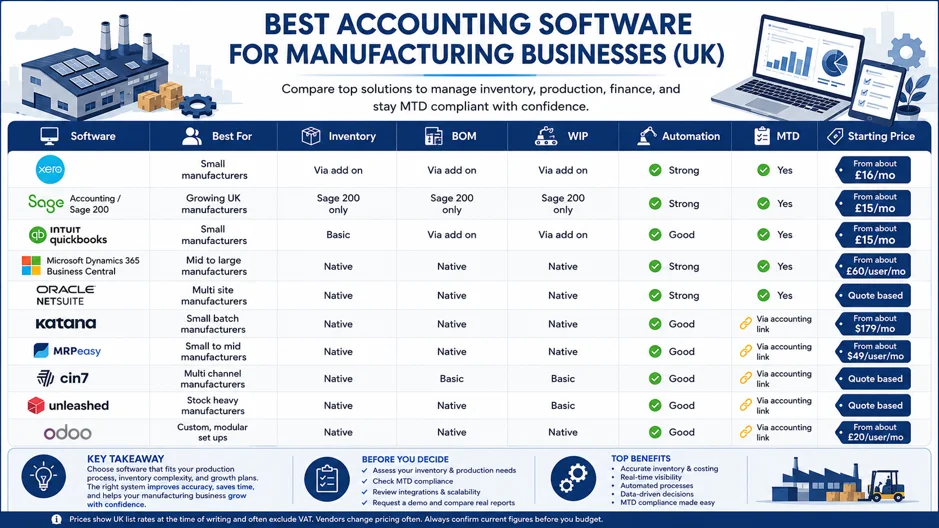
Xero
Best as the accounts and MTD layer for a small manufacturer. Xero covers core accounting and light stock for up to 4,000 tracked items. For proper BOM, WIP and production planning, you add a tool like MRPeasy, Katana or Unleashed. Base the choice on how complex your production is, not on staff numbers.
Sage Accounting and Sage 200
Sage Accounting handles general bookkeeping and VAT, but it is not a manufacturing system. Sage 200 works well for finance, buying, and stock control, though its old built-in Manufacturing module has been retired. New manufacturing setups now use a supported add-on such as Cim200 or Sicon Manufacturing, or a different ERP with production built in.
QuickBooks
QuickBooks Online Plus gives you core accounts, purchase orders, basic stock and project profit tools. It does not replace a full MRP system for multi-level BOMs, scheduling or detailed WIP, so busier factories usually add a specialist tool.
Microsoft Dynamics 365 Business Central
Best when you want finance and manufacturing in one ERP. The Premium plan includes production BOMs, routings, production orders, capacity planning and manufacturing costing. UK list pricing is £84.60 per user per month, billed yearly and before VAT, on top of setup, support and any add-ons.
Oracle NetSuite
Best for complex, multi-entity or international manufacturers that want finance, stock, planning and production in one cloud ERP. Manufacturing sits in its own modules. Pricing is quote-based, with an annual licence for the platform, users and modules, plus a one-off setup cost.
Katana
Katana offers visual stock, production planning, BOMs, buying and links to Xero and QuickBooks Online. As of July 2026, the Core plan starts at $299 per month, with Manufacturing Management as a paid add-on. Costs also shift with usage, locations and extras, so check live pricing first.
MRPeasy
MRPeasy suits smaller manufacturers who need planning, BOMs, routings, WIP, shop floor reporting and accounting links. The Starter plan begins at $49 per user per month. UK users should check how it connects to their MTD ready accounts tool.
Cin7
Cin7 Core brings together stock, sales channels and manufacturing. It supports BOMs, assemblies, production costing and, on higher plans, material requirements planning. Core pricing currently starts at $349 per month, with bigger plans adding deeper planning and warehouse features.
Unleashed
Unleashed covers stock, multi-level BOMs, assemblies, production planning, batch tracking and cost reporting. It links to Xero, QuickBooks and Access Financials. It gives strong stock and margin reports, but it is not a full accounts or general ledger tool. Its Core price starts at $399 per month.
Odoo
Odoo is a modular ERP covering accounts, stock, MRP, work-in-progress, and more. Its UK version supports MTD for VAT. The licence can be cheap, so remember to add setup, data moves, custom work, hosting and support to get the real cost.
Which Software Is Right for You
The right choice depends on how you make things, more than on how big you are.
Small firms can start with cloud accounts plus a light stock add on, then move up to MRPeasy, Katana or Sage 200 once BOM, WIP and costing become daily jobs. Multi-site firms want software that pulls reports together while still showing each site. High volume producers need standard costing and variance analysis, and custom firms lean on strong job costing.
| Your Situation | Where to Start | Key Point |
|---|---|---|
| Basic stock or light assembly | Xero or QuickBooks with a stock or MRP app | An accounting package alone will not provide full BOM or WIP management. |
| Small business needing MRP | MRPeasy or Katana with an accounting integration | Check plan limits and ensure compatibility with your MTD workflow. |
| Existing Sage 200 business | Sage 200 with Cim200 or SiCon | Avoid the retired native Sage 200 Manufacturing module. |
| Finance and manufacturing in one platform | Business Central Premium or Odoo | Professional setup and configuration are typically required. |
| Multi-entity or international business | Business Central or NetSuite | Ideal for consolidation, localisation, and multi-company management. |
| Inventory-led assembler | Unleashed with Xero or QuickBooks | Unleashed is an inventory platform, not a full general ledger. |
Common Problems and How Software Helps
Good software will not fix everything on its own, but it removes a lot of daily pain.
Stock mismatches ease when every receipt, move and production step is recorded, though you still need physical counts and careful input. Costing errors show up sooner, because automated COGM sums flag underpriced jobs early. Double entry between the shop floor and the accounts disappears once the tools are linked.
Reporting improves too. Cloud tools give near-live dashboards instead of month-old figures. Accurate stock reports show the book value of your stock and help you spot slow movers and cash tied up in inventory. Dedicated WIP tracking keeps half-finished batches on the books, and MTD ready software builds VAT into daily work.
Manufacturing Accounting Terms Made Simple
A few terms come up a lot when you shop around.
Standard costing means setting an expected cost up front, then checking it against real results. Actual costing records the true cost of each job as it happens. Job costing tracks cost against one order, which is common in custom work. Process costing spreads cost evenly across a steady run of the same item. Inventory valuation measures stock at the lower of cost and what you could sell it for, using FIFO, weighted average or specific items where it fits.
Reports Every Manufacturer Should Track
The right software should produce these without hours of manual work.
Your profit and loss shows how the business traded over a period. Cash flow shows money in and out, which matters most when cash is tied up in stock. The balance sheet shows what you own and owe, including stock value at each stage. Stock reports track levels and value across raw materials, WIP and finished goods.
On the factory side, watch gross margin by product, labour cost per job, and production reports for output, downtime and capacity. Cost centre reports show how each line or department is doing. Forecasts project cash and production needs. Together these tell you far more than a single profit figure.
Where Automation Saves Time and Money
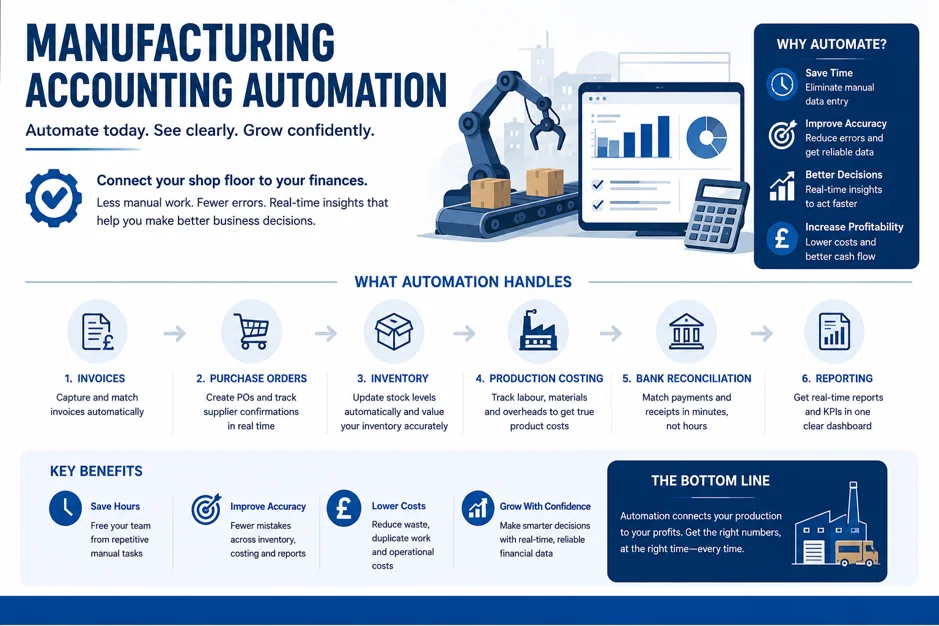
Set up well, manufacturing software can draft invoices, suggest reorders, prepare purchase orders, post stock moves, match bank lines and pull together VAT return data. Payments and VAT filing should still go through proper review and sign-off. Automation cuts the manual load, but it does not remove the need for checks and a human eye.
ERP or Accounting Software
Accounting software focuses on finance, even with add-ons bolted on. An ERP does more. It runs finance, production and stock together, and often HR and CRM too.
| Factor | Manufacturing Accounting Software | ERP |
|---|---|---|
| Features | Core accounting with add-ons for BOM, WIP, and stock management | Finance, production, inventory, purchasing, and HR in one platform |
| Cost | Lower upfront cost, but add-ons can increase the total price | Higher investment, including licences, implementation, and support |
| Complexity | Moderate, depending on integrations and workflows | Higher, with more configuration, training, and ongoing management |
| Best Fit | Smaller manufacturers needing production and financial reporting | Integrated, multi-site, or multi-entity businesses with complex operations |
Size alone should not decide this. Look at your production stages, BOM complexity, number of sites and legal entities, tracing needs, transaction volume, integrations and reporting. Compare the full cost over at least three years, including licences, setup, data moves, support and staff time.
UK Compliance and Business Points
A few UK-specific points are worth a checklist.
Making Tax Digital for VAT is already required, and MTD for Income Tax is now live for sole traders and landlords over £50,000. Check your chosen plan sits on HMRC’s recognised software list. Your software should support the right VAT codes for standard, reduced, zero-rated and exempt items, and exported goods only zero-rated when the rules are met, and you keep proof of export.
Multi-currency matters if you import materials or export goods. Personal data must follow UK data protection rules, including the rules for sending data overseas. On security, look for encryption, backups and two-factor login as standard.
How Much Does It Cost
Costs move with users, modules and how complex your production is. Core accounting can start around £16 a month. Dedicated manufacturing tools range from about $49 per user to several hundred dollars a month. Full ERP systems are often quote-based.
Also budget for setup, data moves, training, integrations and support. Judge the return through fewer stock errors, less admin and faster reports, rather than expecting to make it all back in year one.
How to Choose Your Software
Work through these steps in order.
First, note your users, sites, order volume and production needs, then check the tool can handle two to three years of growth. Set a realistic monthly budget that includes add-ons. The more production stages you have, the more native BOM and WIP tracking matters.
Match the method to your work, so job costing for custom orders and process costing for batch runs. List the reports you need each week, not everything the tool can produce. Pick software that can add users or modules without a full switch. Check it links cleanly with payroll and CRM, and weigh the vendor’s manufacturing know-how, setup method, support hours and UK tax knowledge.
Common Mistakes to Avoid
Buying on price alone is the classic trap, because the cheapest plan often lacks the stock depth you need. Ignoring stock features leaves you with an incomplete picture. Choosing a tool that will not scale means a system that fits five staff can jam at twenty.
Rushing the setup causes data errors that take months to fix. Skipping staff training means the team drifts back to spreadsheets. And ignoring links to payroll and other tools recreates the double entry you were trying to escape.
Frequently Asked Questions
It depends on size and complexity. Small firms often pick Xero or QuickBooks plus an add-on. Growing firms tend to need MRPeasy, Sage 200 or Business Central.
Stay with accounting software and an add-on if it covers your BOM and WIP needs. Move to ERP once production and finance have to run as one.
Accounting software alone runs about £15 to £65 a month. Add manufacturing features, and you are looking at roughly £100 to £400 a month.
Xero, Sage and QuickBooks all offer MTD ready products. Confirm your plan supports the right tax service on HMRC’s current list.
Xero handles core accounts well. For BOM and WIP, add a tool like Katana or Unleashed.
Gross manufacturing margin, stock turnover, production speed and on-time delivery matter most.
Most modern tools link to payroll, CRM and e-commerce, which avoids typing the same data twice.
Final Thoughts
Choosing the best Accounting Software for manufacturing businesses is not about the longest feature list. It is about matching the tool to how you make, sell and grow.
Start simple if you are small, with cloud accounts and a focused stock add on. Once BOM, WIP and job costing shape your daily decisions, that is your cue to move up to a dedicated platform or Sage 200. Whatever your size, do not choose on price alone. Plan the setup, and train your team before you go live. An accountant who knows manufacturing can save you months of trial and error.
At Lanop, we support UK businesses with cloud accounting, bookkeeping, VAT, payroll, year-end accounts and ongoing advice. A dedicated Chartered Accountant leads our small business accounting service and grows with you as your reporting and compliance needs get more complex. Ready to get your accounts and software working together? Contact us for a free consultation, and we will help you find the right setup.