
Payroll software shapes how your firm runs. Pick the wrong tool and every pay run drags. Pick the right one, and you win back hours each week.
This guide compares ten of the best payroll tools for UK accountants. We look at cost, rules, and how well each one copes with lots of clients.
At Lanop Business and Tax Advisors, we work with UK firms every day on payroll, bookkeeping, and cloud accounting. Every figure here has been checked against HMRC guidance for the 2026/27 tax year.

What Is the Best Payroll Software for Accountants
There is no single winner. The right choice depends on your client count, your budget, and how tricky your payrolls get.
Most UK practices run several client payrolls at once. BrightPay and Staffology often win on value and bureau tools. Bigger firms tend to look at IRIS or Moorepay for deeper reporting. If you are a sole trader with light needs, Moneysoft or a free HMRC tool may be plenty.
What Changed for Payroll in 2026
Three shifts matter this year, and each should shape what you buy.
Sick pay rules have been rewritten
Statutory Sick Pay changed on 6 April 2026. It is the biggest shake up in over forty years.
Sick pay now starts on day one, because the three-day wait has gone. The old earnings test has gone too, so lower-paid staff qualify. The rate is £123.25 a week, or 80 per cent of average weekly earnings if lower.
Desktop payroll is winding down
BrightPay went cloud-only from 2026/27, and its Windows version no longer gets compliance updates. IRIS has retired old desktop tools too, including the free IRIS Payroll Basics.
Benefits move into payroll from 2027
HMRC will phase in payrolling of benefits in kind from 6 April 2027. Company cars, vans, fuel, and medical cover come first. Most other benefits follow in 2028.
Why the Right Payroll Software Matters
The daily pressure on payroll teams
Payroll dates do not move. Real Time Information must reach HMRC on or before payday. Miss one date and a penalty can land within days.
Firms with many clients face a second problem. Staff hop between systems and chase approvals. They also retype data that already sits in the books. All these waste hours every week.
Payroll is now a growth service
Modern payroll software does far more than file tax forms. It runs staff portals, handles auto-enrolment pension duties on its own, and can even release bank payments.
Some firms treat payroll as a chore. Others treat it to grow, and pick tools with client logins, their own branding, and bureau workflows.
Speed protects your fees
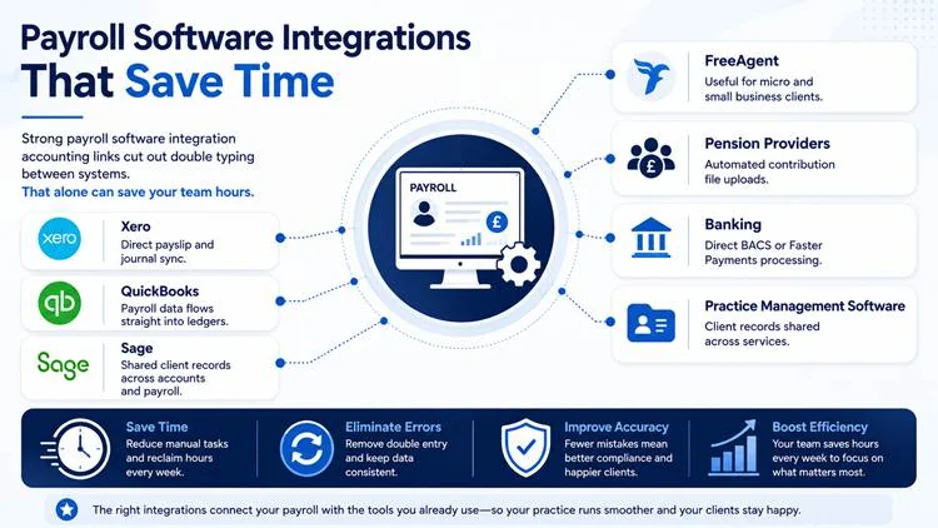
Good software cuts manual typing. That is truest when it links straight to Xero, QuickBooks, or Sage.
Speed protects your margin too. Software that adds a few minutes per client soon costs you real money.
How We Picked These Tools
We judged each one against what UK practices need, not the feature lists in most reviews.
- HMRC recognition and reliable RTI filing
- CIS, Auto Enrolment, and statutory payments
- Ready for the 2026/27 sick pay rules
- Multi-client and bureau licences
- Links to the main accounting platforms
- Clear pricing and true cost per client
- Easy for staff, with employee self-service
- Help with moving your data across
Every product here sits on HMRC’s list of payroll software recognised by HMRC. Prices were checked on provider sites. Several firms now quote on request, so confirm before you buy.
Best Payroll Software for Accountants Compared Briefly
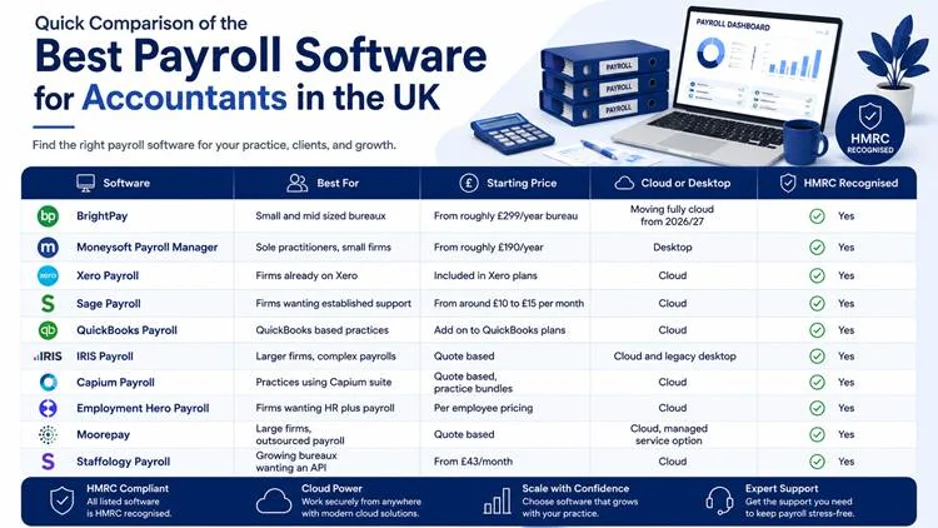
This table shows how the ten tools differ on delivery, pricing, CIS, and the kind of firm each suits. Short reviews follow.
| Software | Delivery | Pricing Model | CIS | Best For |
|---|---|---|---|---|
| BrightPay | Cloud only | Based on employer and employee numbers | Yes | Small and medium payroll bureaux |
| Moneysoft Payroll Manager | Windows desktop | Flat yearly licence from £95 + VAT | Yes | Sole traders and low-cost payroll bureaux |
| Xero Payroll | Cloud | Included with eligible Xero plans; some add per-employee fees | Limited | Firms already using Xero |
| Sage 50 Payroll / Sage Business Cloud Payroll | Desktop and cloud | Monthly fee that increases with staff numbers | Yes | Firms wanting a well-known payroll solution |
| QuickBooks Payroll | Cloud | Add-on for QuickBooks Online | On some plans | QuickBooks-based practices |
| IRIS Payroll Professional | Desktop and cloud | Quote only | Yes | Larger firms and complex payrolls |
| Staffology Payroll | Cloud | Flat monthly fee plus per-payslip charges | Yes | Growing payroll bureaux and API users |
| Capium Payroll | Cloud | Quote only, often bundled | Yes | Existing Capium firms |
| Employment Hero Payroll | Cloud | Per employee, per month | Limited | Firms wanting integrated HR and payroll |
| Moorepay | Cloud and managed service | Quote only | Yes | Larger firms outsourcing payroll |
Prices exclude VAT unless stated. Check current rates with each provider.
The Ten Tools Reviewed
BrightPay
BrightPay is a firm favourite with UK accountants. It is known for simple bureau pricing and an easy screen. From 2026/27 it is cloud only, and the Windows version no longer stays compliant.
It handles multi-employer payroll, Auto Enrolment, and CIS, and links to Xero, QuickBooks, and FreeAgent. Cloud pricing now depends on employer and staff numbers, so ask for a quote before you renew.
Best for small and medium payroll bureaux.
Moneysoft Payroll Manager
Moneysoft is a long-standing Windows tool for sole practitioners and small firms. Its flat yearly licence makes it one of the cheapest bureau-ready options in the UK.
Larger licences cover multi-company payroll, Auto Enrolment, CIS, and statutory pay. There is no cloud access or client portal. Prices start at £95 plus VAT a year, and the multi-employer PM100 licence is £190 plus VAT.
Best for sole traders and firms watching every pound.
Xero Payroll
Xero Payroll sits inside the Xero platform, so it suits firms already using Xero for bookkeeping. Payroll posts straight into the accounts, which removes double entry.
Staff get self-service through the Xero Me app. Bureau tools are thin, though, and CIS is limited. It comes with eligible Xero plans, and some plans add fees per payslip.
Best for accountants already on Xero.
Sage Payroll
Sage brings decades of UK payroll know-how. It sells two recognised products, Sage 50 Payroll on desktop and Sage Business Cloud Payroll in the browser. Check which one a quote covers.
Both handle HMRC filing, Auto Enrolment, CIS, and pension links, and updates land quickly. The screen feels dated, and monthly costs climb with staff numbers. Entry plans start from around £10 a month.
Best for firms wanting a well-known provider with strong support.
QuickBooks Payroll
QuickBooks Payroll is built for firms already on QuickBooks Online. Payroll and bookkeeping sit in one place, and the workflow is simple.
It covers tax filing, Auto Enrolment, payslips, and CIS on eligible plans. Bureau features are light, so it fits smaller volumes best. It is sold as an add-on, priced by plan and staff numbers.
Best for QuickBooks-based practices.
IRIS Payroll
IRIS builds payroll software for complex, high-volume work. Bureau tools and practice management links are strong. IRIS lists several recognised products rather than one, so check which one a quote covers.
The free IRIS Payroll Basics tool was withdrawn in April 2026. Reporting is strong, and it scales well, but setup costs more and pricing is quote only.
Best for larger firms and payroll bureaux.
Staffology Payroll
Staffology is IRIS’s cloud platform, built for modern bureaux and growing firms. Its open API is the standout feature, letting payroll data flow between systems on its own.
You get multi-employer payroll, Auto Enrolment, CIS, and solid automation. The cost needs care. A flat fee of around £43 a month covers up to 19 payslips per pay run. Extra payslips cost more, and pricing is per run, so weekly payrolls cost far more.
Best for growing bureaux and tech-led firms.
Capium Payroll
Capium Payroll is part of the wider Capium suite, which suits firms wanting everything under one roof. Workflows smoothly between payroll, accounts, and practice management.
It covers HMRC filing, Auto Enrolment, CIS, and a client portal. The trade-off is fewer outside connections. Pricing is quote-based and often bundled.
Best for firms already using Capium.
Employment Hero Payroll
Employment Hero pairs payroll with HR, so leave, onboarding, and pay live in one place. Automation is strong, and staff get a self-service area.
There is a separate free version on HMRC’s free list for employers with fewer than ten staff. The paid version is priced per employee, per month, so costs rise with headcount. It is less suited to bureau work.
Best for firms wanting HR and payroll together.
Moorepay
Moorepay offers software and a fully managed service. It suits firms that want expert hands rather than another system to learn.
You get Auto Enrolment, compliance checks, and a named account manager. It costs more than software alone, and can be more than a small practice needs. Pricing is quote-based.
Best for larger firms outsourcing payroll.
Which Tool Suits Your Practice
Start with client count, not brand name. A sole practitioner with five simple payrolls needs a very different tool from a bureau running two hundred.
Sole traders and small firms
If you run a handful of simple payrolls, do not pay for features you will never open. Moneysoft and HMRC Basic PAYE Tools cover the basics. As your client list grows, BrightPay and Xero Payroll balance cost, compliance, and automation, which helps if you also handle bookkeeping.
Growing practices and bureaux
More payroll clients means you need software that scales. Staffology and IRIS Payroll bring bureau features and multi-client control. Check the per payslip cost at your real volumes first. If you would rather hand the job over, our outsourced payroll bureau service runs multi-client pay runs, RTI filing, and pension submissions for you.
Larger firms and bookkeepers
For complex, high-volume payrolls, weigh IRIS Payroll against Moorepay. If bookkeeping is your main service, Xero Payroll and QuickBooks Payroll sync pay data into the accounts on their own.
HMRC Rules Your Software Must Get Right
The figures below come from HMRC’s rates and thresholds for employers 2026 to 2027. Whatever you buy must apply them from your first live pay run.
National Insurance and Employment Allowance
The employer National Insurance rate stays at 15 per cent for 2026/27. The Secondary Threshold, where employer National Insurance starts, stays at £5,000 a year.
The Lower Earnings Limit rises to £6,708 a year, up from £6,500. This is the point where pay starts counting towards state benefits. It is not where National Insurance kicks in, so do not mix the two up.
Employment Allowance stays at £10,500. The old £100,000 cap was scrapped in April 2025, so larger employers can now claim. Firms whose only employee above the threshold is a director still cannot.
Testing sick pay in a demo
Sick pay is no longer a flat weekly figure for everyone. Your software must work out 80 per cent of average weekly earnings. It then pays the lower of that and £123.25.
It must also start on day one and cover lower paid staff who used to fall outside the rules. Ask any provider for a worked example before you sign.
Pension thresholds for 2026/27
Pension figures are unchanged. The trigger for automatic enrolment stays at £10,000, the lower band stays at £6,240, and the upper band stays at £50,270. The Pensions Regulator publishes the full automatic enrolment earnings thresholds each year.
Getting ready for payrolled benefits
Many firms miss this one. From 6 April 2027, company cars, vans, fuel, and medical cover must run through payroll. Most other benefits follow in 2028.
P11D reporting carries on during the switch, so your software must cope with both. Ask providers about their build plan for the extra RTI fields HMRC will need.
Your 2026/27 settings checklist
Before your first live pay run, check these figures are loaded:
- Personal allowance £12,570, with 1257L as the standard tax code
- Employer National Insurance 15 per cent above £5,000
- Lower Earnings Limit £6,708 and Upper Earnings Limit £50,270
- National Living Wage £12.71 for ages 21 and over. It is £10.85 for ages 18 to 20, and £8 for under 18s and eligible apprentices
- Family related statutory pay at £194.32 a week, or 90 per cent of average weekly earnings if that is lower
- Sick pay at £123.25 a week, or 80 per cent of average weekly earnings if lower
- Statutory pay recovery at 92 per cent. It rises to 109 per cent if last year’s Class 1 National Insurance was £45,000 or less
- Student loan thresholds of £26,900, £29,385, £33,795, and £25,000 for Plans 1, 2, 4, and 5. Postgraduate loans start at £21,000
Cloud or Desktop in 2026
Cloud payroll suits firms that want remote access, automatic updates, and client logins. Desktop still works for steady, simple payrolls.
The market has clearly picked a side, though. BrightPay’s desktop tool ended after 2025/26, and IRIS has retired its old desktop range. If you still use desktop software, plan your move before your next renewal. Our online accounting services can help you shift to the cloud without disrupting live client pay runs.
Running Payroll for Many Clients
Firms with dozens of clients need batch runs, so many payrolls go through at once instead of one by one. Bulk filing saves real hours every cycle.
Approval screens let business owners sign off pay runs online, which cuts the email back and forth. Staff portals ease queries about payslips, P60S, and holiday.
Bureaux need tools built for the job, not single client software stretched to fit. Look for a plan that stays affordable as client numbers climb.
AI Checks and Automation
Automated checks now flag odd pay changes before you file. They catch missing pension sums and spot duplicates, which is the sort of slip a manual review misses.
Reminders warn you about filing dates, tax code changes, and year-end jobs. Built-in sums handle statutory pay and pension checks.
These tools do not replace judgement, though. A skilled payroll administrator still reviews flagged items before anything goes to HMRC.
Keeping Payroll Data Safe
Payroll holds salaries, bank details, and personal records. Security cannot be an afterthought.
- Two-factor login for every user
- Role-based permissions that limit client data access
- Audit logs tracking each change to a payroll record
- Cloud backups that guard against data loss
- Encrypted storage in line with GDPR
How Payroll Pricing Really Works
Pricing varies so widely that fair comparison is hard. Some charge per employee, per month. Others sell a bureau plan with one flat yearly fee covering many clients.
A third group charges per payslip, per pay run. That matters a lot. A weekly payroll costs far more than a monthly one at the same headcount. Watch for extras too, such as spare payslips, CIS, or client portals.
Cost per client usually matters more than cost per employee. Run your own numbers rather than comparing headline rates.
Free Tools Versus Paid Software
HMRC Basic PAYE Tools is still free and recognised for employers with fewer than ten staff and very simple needs. A few commercial providers offer free tiers on the same basis.
Free tools have real limits. There is no Auto Enrolment check, no CIS, and no bureau features, so most firms outgrow them fast. Once you run several client payrolls, paid software pays for itself.
How to Switch Without Drama
- Confirm your notice period with the current provider
- Export full year-to-date payroll history for every client
- Check pension file formats match the new software
- Import staff records and check tax codes before you go live
- Run a parallel pay run and compare old and new outputs
- Test a sick pay sum under the new percentage rules
- Tell clients and staff about any portal or app changes
- Keep access to the old system until year-end is filed
Mistakes to Avoid
- Choosing on price alone, without checking cost per client at scale
- Ignoring CIS until a building trade client signs up
- Assuming sick pay is still a flat rate for everyone
- Skipping a parallel run when you switch mid-year
- Underestimating how long staff need to learn a new system
Frequently Asked Questions
There is no single answer. BrightPay and Staffology suit most small and mid-size bureaux. IRIS and Moorepay suit larger practices with more complex client books.
Every tool in this guide sits on HMRC’s recognised list. That covers BrightPay, Moneysoft, Xero Payroll, Sage, QuickBooks, the IRIS range, Staffology, Capium, Employment Hero, and Moorepay. HMRC updates the list often, so check before you buy.
BrightPay, IRIS Payroll, Moneysoft, Sage, Staffology, and Capium all handle CIS deductions. QuickBooks covers CIS on some plans, and Xero Payroll is more limited here.
Costs range widely. Free HMRC tools sit at one end. Flat yearly licences start under £100, and bureau plans can run into thousands. Pricing may be per employee per month, or per payslip per pay run.
Most recognised providers updated for the April 2026 changes, but the sum is no longer simple. Ask for a worked example covering a lower-paid employee first.
Choosing With Confidence
Small firms should put ease of use and accounting links first. Xero Payroll and BrightPay both do well there. Bureaux should put steady pricing and batch runs first, where BrightPay, Staffology, and IRIS all score highly.
Whatever you pick, check your 2026/27 settings from day one. Confirm the National Insurance thresholds, Employment Allowance, pension figures, and the new sick pay sum. Our guide on choosing the right MTD software for your business is a useful companion read, covering what HMRC’s recognised list requires before you go live.
Want help choosing best Payroll Software for Accountants? Lanop works with UK firms every day on payroll, bookkeeping, and cloud accounting. Get in touch with Lanop to talk through your payroll needs today.