
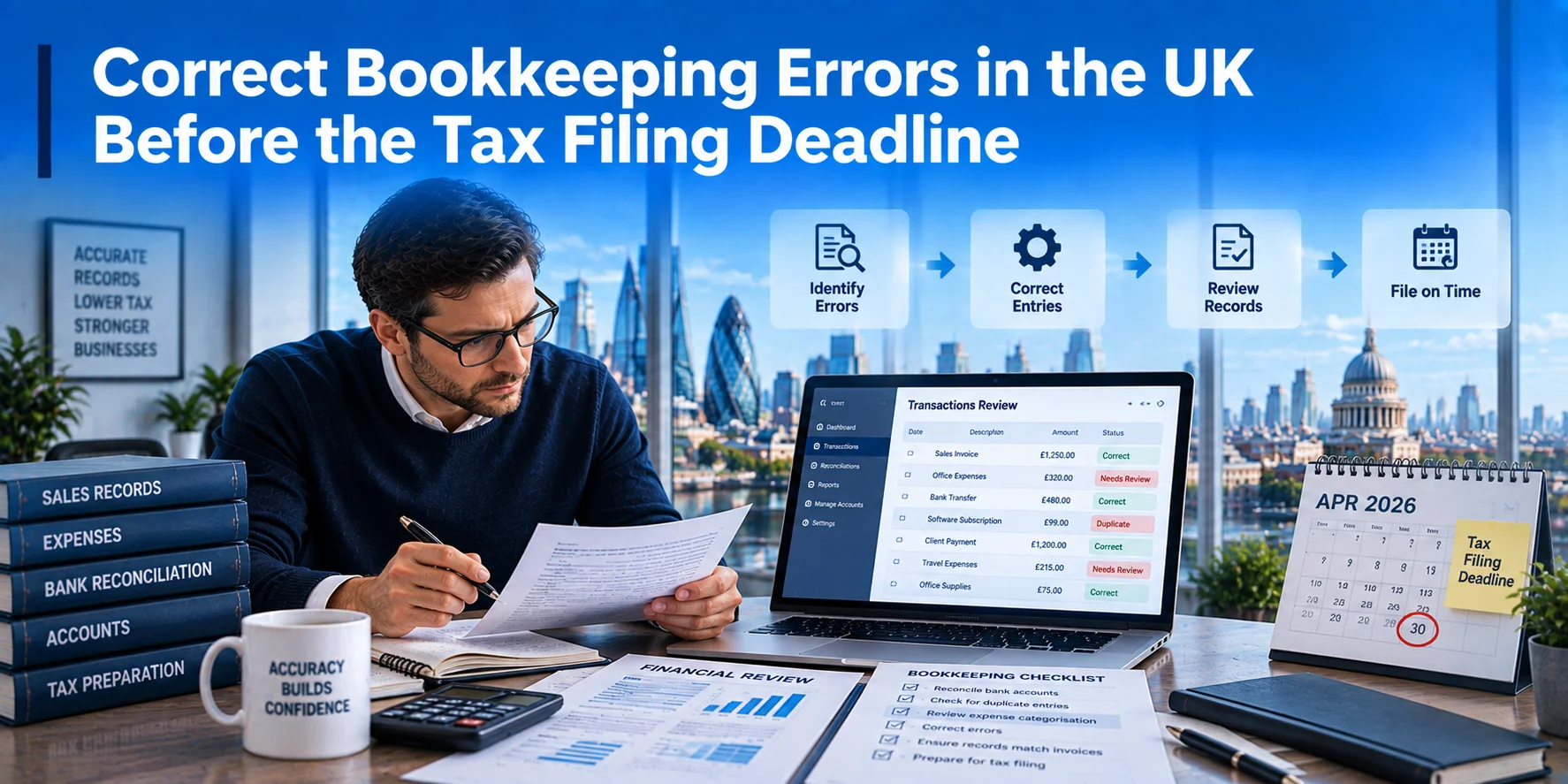
Found a mistake in your books close to a deadline? Take a breath. Most bookkeeping errors are fixable. Finding one early is a good sign. It is not a crisis.
Correcting bookkeeping errors UK-wide starts with one simple step. Work out what the mistake affects.
A wrong figure in your software doesn’t always mean HMRC has the wrong information too. Software fixes and tax return fixes are two different jobs.
Different taxes have different rules. What fixes a VAT error will not fix a payroll error. This guide walks you through each situation, so you know your next move.
What Counts as a Bookkeeping Error?
Bookkeeping errors are mistakes in your day-to-day records. Think duplicate invoices, missing expenses, wrong dates, or a bank transaction filed under the wrong category.
Bookkeeping Error vs Accounting Error vs Tax Return Error
These three sit in a chain. A bookkeeping record feeds your accounts. Your accounts feed your tax calculation. That calculation feeds your tax return.
An error at the start can travel all the way through. A duplicate invoice can inflate your accounts. That can overstate your taxable profit. And that can show up wrong on your tax return.
This is why catching mistakes early matters so much, which is one reason good bookkeeping practices matter from day one.
Do All Bookkeeping Errors Affect Your Tax Bill?
No. Some errors change what you owe. Others change how something looks.
Errors that usually change tax include missed income, missing expenses, incorrect VAT treatment, or payroll figures that don’t match what HMRC was told.
Errors that often do not change tax include a transaction filed under the wrong category. As long as the total amounts stay correct, this is more of a tidy-up job.
Finding a mistake does not mean you owe HMRC money. Many fixes have no tax effect.
Common Bookkeeping Errors to Check Before Filing
Missing or Duplicate Income and Expenses
Forgotten invoices happen. This is common with irregular clients. Duplicates happen too. Often a bill gets entered twice after a reminder email lands.
Watch for expenses you paid from your own pocket. These sometimes never make it into the business books. Also check for income recorded in the wrong month or tax year. Both can shift your figures more than you expect.
Bank Reconciliation and Bank Feed Errors
Bank feeds are handy but not perfect. Duplicate feeds create phantom transactions. Missing entries leave gaps. Wrong automatic matching can pair the wrong invoice with the wrong payment.
Check your opening balances too. An error here throws off every figure that follows.
Also look for transfers between your own accounts wrongly logged as income. And watch for credit card payments logged as expenses twice. This happens once when the money is spent, and again when the card bill is paid.
VAT and Payroll Errors
Wrong VAT codes are common, especially in mixed-rate businesses. Missing VAT and duplicate VAT entries can both throw off your VAT return.
On the payroll side, journal entries in your software can drift away from what was sent through FPS or EPS. We will cover the full fix for both further down in this guide.
Ecommerce and Payment Processor Errors
If you sell through Stripe, PayPal, Shopify, Amazon, or another marketplace, the cash landing in your bank is rarely your true sales figure.
Platform fees, refunds, and rolling payouts all sit between a sale and the money you see. Do not assume the net bank payout is your turnover. Reconcile the platform report to the underlying sales, refunds, fees, and taxes, and record each item in the right place in your books.
How to Find Bookkeeping Errors Before Filing
Before touching your tax return, run a proper review. This checklist covers the most important areas.
- Reconcile every bank account.
- Reconcile credit cards
- Compare sales records against invoices and platform reports.
- Review supplier bills for duplicates or gaps.
- Check for missing or duplicate expenses.
- Review your VAT account balances.
- Compare payroll records against what was sent to HMRC.
- Check director or owner transactions.
- Investigate any unusual or unexplained journal entries.
- Review opening balances against last year’s closing figures.
A slow, careful pass through this list catches far more than a quick scan.
How to Correct Bookkeeping Errors Before the Tax Filing Deadline
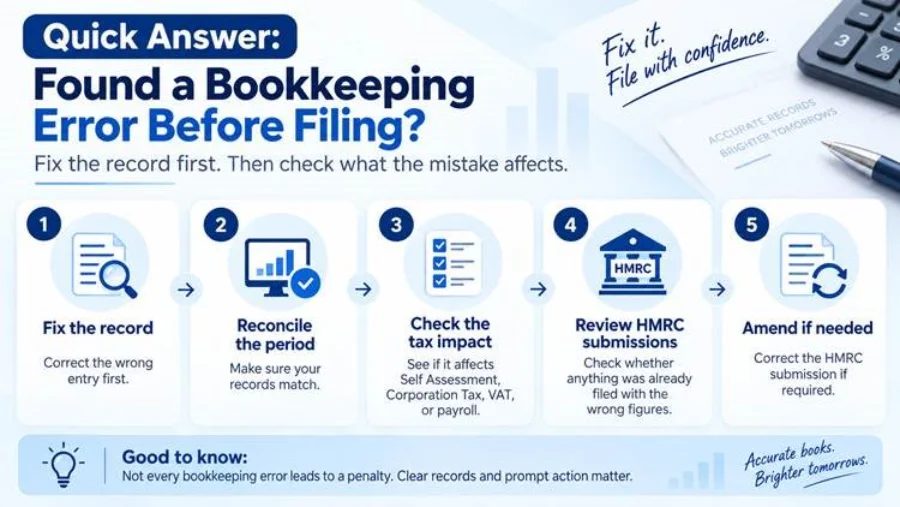
Here is the practical process. This covers how to fix bookkeeping errors before the tax filing deadline in real life.
Step 1: Identify the Exact Error
Pin down the transaction. Note the amount, date, category, and VAT treatment. Check which account it sits in.
Step 2: Find the Accounting and Tax Period Affected
Work out which month, VAT quarter, tax year, or company accounting period the error falls in. This decides which correction rules apply to you.
Step 3: Check Whether the Error Changes Tax
Ask if it affects income, allowable expenses, VAT, payroll figures, or your taxable profit. If none of this change, your job may be to tidy the books.
Step 4: Check Whether the Return Has Already Been Filed
This is where your path splits into two.
- Before filing: Correct the record, reconcile the period, recalculate using the right figures, then file.
- After filing: Correct the record first. Then work out which return was based on the wrong figures. Follow the correct amendment process for that specific tax.
Step 5: Correct the Underlying Bookkeeping Record
Depending on the mistake, you might edit the entry, reverse it, or post a correcting journal. You could also raise a credit note. Rematching or unmatching a bank transaction can also fix simple feed errors.
Avoid simply deleting an entry just to make the numbers balance, especially if that removes the audit trail. Use the correction, reversal, credit note, or journal process that fits the error, and keep enough evidence to show what changed and why.
Step 6: Reconcile and Keep an Audit Trail
Once fixed, reconcile the period again. Confirm everything ties out.
Keep a short note of what was wrong. Record when you found it and what you changed. This note protects you if HMRC ever asks about the figures.
Correcting Your Books vs Correcting a Tax Return
Is fixing Xero or QuickBooks enough on its own? Usually not, if you’ve already sent a return to HMRC.
Changing your accounting software fixes your own records. It does not automatically update anything already sent to HMRC. These are two separate systems.
If You Find the Error Before Filing
This is the easiest scenario. Fix the books, reconcile, and file using the right figures. No separate notice is needed, because nothing has gone to HMRC yet.
If You Find the Error After Filing
Work out exactly which return the error touched. It might be a Self-Assessment return, a Company Tax Return, a VAT return, or a payroll submission. Then follow that tax’s own correction route.
Can You Correct an Old Error in Next Year’s Books?
It is tempting to adjust next year’s figures and move on. This is usually the wrong move for a genuine prior period error.
It can misstate both years. It also makes it harder to explain your figures if HMRC ever asks. The affected period generally needs its own fix.
How to Correct Errors After Self-Assessment or Corporation Tax Filing
Self-Assessment Errors
Catch a mistake before you submit? Just correct it before you send the return.
Once filed, you can normally amend a tax return bookkeeping error online within 12 months of the 31 January filing deadline. If HMRC sent your notice to file after 31 October, you get 15 months from that notice instead.
Once that window closes, you can’t amend online. You would need to write to HMRC directly. An overpayment relief claim can usually still be made within 4 years of the end of the tax year, if you paid too much, and reviewing your Self-Assessment position early can help avoid this situation altogether.
Company Tax Return Errors
For Corporation Tax, the filing deadline falls 12 months after your accounting period ends. You then get a further 12 months from that filing deadline to amend the return. This gives you roughly 24 months from the end of your accounting period.
After that window closes, an overpayment relief claim may still be available if the company paid too much Corporation Tax. The normal time limit is 4 years from the end of the relevant accounting period. If the company underpaid Corporation Tax and can no longer amend the return, HMRC says to use its online disclosure service as soon as possible.
Filed Company Tax Returns are separate from your accounts filed at Companies House. Check whether both need attention. Do not assume fixing one covers the other.
How to Correct VAT Bookkeeping Errors
Correct VAT bookkeeping errors with confidence, once you know the thresholds.
Identify and Calculate the VAT Error
Work out the net value of the error. Add up any VAT you underpaid. Then subtract any VAT you overpaid. This gives you one net figure.
When Can a VAT Error Be Corrected on the Next VAT Return?
Under current HMRC rules, you can adjust the error on your next VAT return if the net value is £10,000 or less. You can also do this if it is between £10,000 and £50,000 and does not exceed 1% of the box 6 figure on the VAT return for the period in which you discover the error.
This method only works if the error was not deliberate.
When Must HMRC Be Told Separately?
If the error is above £50,000, you must report it to HMRC directly. The same applies if it is above £10,000 and more than 1% of box 6.
You can no longer use form VAT652. HMRC now directs businesses to its VAT error checker, which tells you whether to correct the next VAT return, make the correction online, or notify HMRC in writing.
Always report deliberate errors separately, no matter the amount.
What VAT Correction Records Should You Keep?
Keep a note of when you found the error. Record the VAT period, the nature of the mistake, and the amount involved. Save the supporting evidence and note exactly what action you took.
You generally have a four-year window to correct old VAT errors. This is why the record still matters years later.
How to Correct Payroll Bookkeeping Errors
Payroll bookkeeping errors UK-wide often come down to one key point. Your payroll journal in the software can be wrong, while the FPS or EPS you send to HMRC is correct. Or it can work the other way. Your bookkeeping might look fine, while the HMRC submission itself holds the mistake.
Start by comparing your payroll journals against what was reported through FPS and EPS.
If the bookkeeping entry is wrong, correct that record. If the HMRC submission itself is wrong, use the payroll correction route that matches the error. For current-year pay or deduction errors, HMRC normally says to update the year-to-date figures in the next regular FPS. For an EPS error, send an EPS with the correct year-to-date figures. Earlier-year FPS corrections have separate rules.
Correcting Bookkeeping Errors Under Making Tax Digital in 2026
Who Is Affected by MTD for Income Tax in 2026?
From 6 April 2026, sole traders and landlords whose qualifying income for 2024 to 2025 was more than £50,000 must use Making Tax Digital for Income Tax, unless an exemption applies. Qualifying income is broadly the total gross income from self-employment and property before expenses.
The threshold drops to more than £30,000 from April 2027, based on 2025 to 2026 qualifying income. It drops again to more than £20,000 from April 2028, based on 2026 to 2027 qualifying income.
What If You Find an Error After a Quarterly Update?
A quarterly update is a summary, not a tax return. It reports totals from your digital records, and no tax or accounting adjustments are required before you send it.
Each quarterly update covers from the start of the tax year to the end of that update period. Your software works out the cumulative totals for you.
What If the Error Is Found Later in the Tax Year?
If you correct a digital record during the tax year, the correction will be reflected when you send your next quarterly update. You normally do not need to go back and resend an earlier quarterly update just because you found the mistake later.
Does Every Quarterly Update Need to Be Resubmitted?
No, not usually. Because each update covers the year to date, a correction made during the tax year can flow through the next quarterly update without resubmitting the earlier one.
There is one important exception. If you have already sent your fourth quarterly update and then change your digital records, you may need to resend the fourth update before you make final tax adjustments and submit your Income Tax return through your compatible software.
What If Receipts or Invoices Are Missing?
Try to Replace Missing Records First
Before you assume a record is gone for good, check a few places. Look for a supplier copy, an email invoice, an online portal download, or a transaction history from your payment platform.
You can find most missing paperwork this way.
Can a Bank Statement Replace a Receipt?
Partly. A bank statement shows that a payment happened. It does not always prove what was bought, or why it counts as a business expense.
It is useful supporting evidence. It is not always a full substitute for the receipt itself.
What If the Record Cannot Be Recovered?
If you cannot recreate all the records, HMRC allows provisional or estimated figures in some Self Assessment cases. Use a reasonable figure based on the best evidence available and explain in the return that you have used an estimate or provisional figure. A provisional figure must be replaced with the final figure when it becomes available.
If you are unsure whether an estimate fits your situation, this is a good moment to ask an accountant.
How Long Should Bookkeeping Records Be Kept?
Sole traders and landlords should keep records for at least 5 years after the 31 January submission deadline for that tax year.
Limited companies should usually keep accounting and Corporation Tax records for at least 6 years from the end of the relevant company financial year or accounting period. Records may need to be kept longer in some cases, including where a return was filed late or HMRC has opened a compliance check.
Will HMRC Penalise You for a Bookkeeping Error?
A bookkeeping mistake does not automatically create an HMRC penalty. Genuine errors happen. HMRC’s own penalty rules reflect that.
Reasonable Care
If you took reasonable care when preparing your figures and still made a genuine mistake, HMRC says it will not charge an inaccuracy penalty for that mistake.
Careless and Deliberate Errors
Careless errors happen when you don’t take reasonable care. These can attract a penalty.
Deliberate errors are different. This is when someone knowingly submits wrong figures. HMRC treats this far more seriously, and penalties can be much higher.
Prompted and Unprompted Disclosure
If a penalty does apply, telling HMRC before you have reason to believe it has discovered, or is about to discover, the inaccuracy is an unprompted disclosure. HMRC’s minimum penalty is lower for an unprompted disclosure than for a prompted one, and a careless inaccuracy can sometimes be reduced to nil.
Correcting things promptly is almost always the better path.
What If the Error Caused Too Little Tax to Be Paid?
You may owe the extra tax, plus interest from the original due date. A penalty may or may not apply. This depends on whether the error was careless or deliberate, and how you disclosed it.
What If You Paid Too Much Tax?
You can usually claim a refund through an amendment if you are still within the time limit. If that window has closed, you may still be able to claim overpayment relief.
Should You File if You Know Your Bookkeeping Figures Are Wrong?
Do not knowingly submit figures you believe are inaccurate just to hit a deadline. But if final figures genuinely cannot be obtained in time despite your best efforts, HMRC does allow reasonable provisional or estimated figures in some circumstances.
Clearly identify any provisional or estimated figures, explain why you have used them, and use the best information available. Replace provisional figures with the final figures as soon as they become available.
How Much Does It Cost to Correct Bookkeeping Errors?
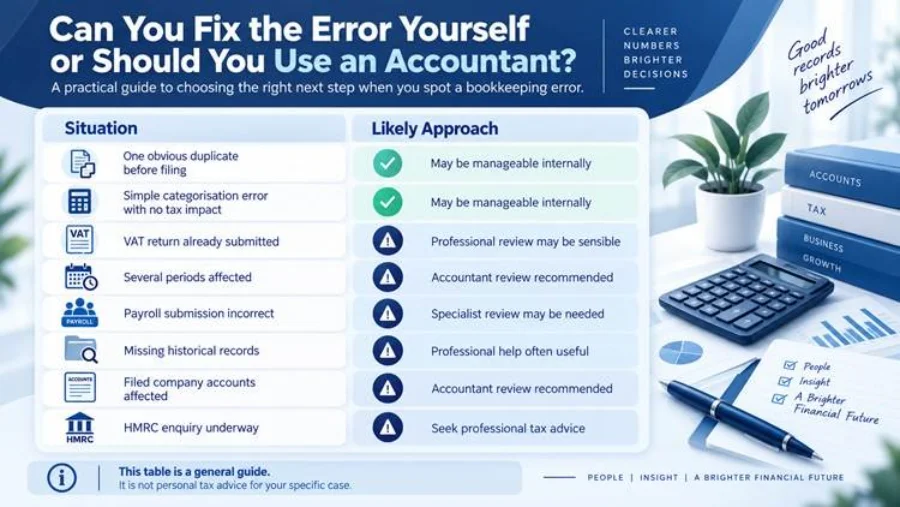
The cost of correcting bookkeeping errors varies a lot. It depends on your transaction volume, how many periods are affected, and how complex your VAT position is.
Payroll involvement matters too, as do missing records, e-commerce platforms, and multiple currencies. How reconciled your accounts already are also plays a part, along with whether you have already filed returns or HMRC correspondence is already underway. If an HMRC enquiry is already underway, it’s worth getting specialist HMRC tax investigation support rather than handling it alone.
The longer an error sits uncorrected, the more historical detail there is to untangle. Fixing it early is almost always cheaper than fixing it later.
Conclusion: What Should You Do Next?
Found the error before filing? Correct the underlying records, reconcile them properly, and file using accurate figures.
Already filed the return? Identify exactly which tax return or HMRC submission was affected. Then follow that return’s specific amendment or correction process.
Is the error complex? Does it span several periods, or touch more than one tax? Are you simply unsure what to do? Get a professional review before making further changes. Fixing a mistake properly the first time is always easier than fixing a fix that went wrong.
If you have found a bookkeeping error before a filing deadline, Lanop can help. We can review the affected records, reconcile the figures, and check whether your VAT, payroll, Self-Assessment, or Corporation Tax filings need attention too. Speak with Lanop today before a small bookkeeping issue becomes harder to untangle.
Frequently Asked Questions
Yes. Fix the underlying record first. Reconcile the affected period. Then file using the corrected figures. This is the simplest route, since nothing has reached HMRC yet.
No. Many bookkeeping errors have no tax effect and only need to be corrected in your own records. HMRC generally needs to be told when a filed return or submission needs correcting, or when the rules for a particular tax require separate notification, such as certain VAT errors.
Yes, you can correct the record in your software. Whether you also need to report it to HMRC depends on the size of the VAT error and whether it falls within the self-correction threshold.
This usually points to a reconciliation error. It could be a missing entry, a duplicate feed, or a wrong opening balance. Reconciling every account is the fastest way to find the mismatch.
Because each quarterly update covers the tax year to date, a correction made during the year will normally be picked up in your next quarterly update. If you have already sent the fourth update, you may need to resend that fourth update before finalising and submitting your Income Tax return.